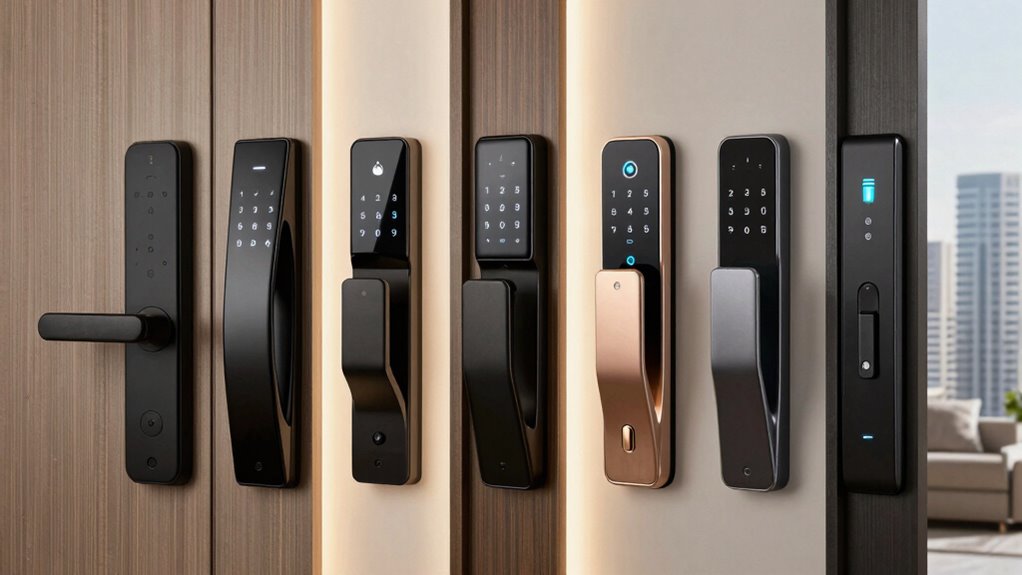
Renters often need a smart lock that combines flexibility, easy installation, and smart home compatibility without requiring permanent modifications. The SwitchBot Smart Lock Pro stands out as the best overall thanks to its no-drill installation and broad device compatibility. Other notable options include the Philips Wi-Fi Smart Lock, known for its seamless integration with voice assistants, and the eufy Security Smart Lock C30, which offers reliable Wi-Fi connectivity and user-friendly app control. These locks present a common tradeoff: some prioritize ease of installation and portability, while others focus on advanced features or integration. Keep reading for a detailed breakdown of each option to help you find the best fit for your rental situation.
Complete the kit



Key Takeaways
- Ease of installation is the top priority for most renters, making no-drill or non-destructive options highly desirable.
- Compatibility with major smart home ecosystems like Alexa, Google Assistant, and Apple Home is critical for seamless control.
- Wi-Fi connectivity and remote access features are often limited or require additional hubs, influencing overall ease of use.
- Price varies widely, with premium models offering advanced features, but many affordable options provide excellent value for temporary setups.
- Durability and build quality should be considered, especially for renters who want a lock that can withstand frequent removal and reinstallation.
| SwitchBot Smart Lock Pro Keyless Entry Door Lock, Retrofit Deadbolt for Existing Locks, No-Drill Installation, Compatible with Siri, Alexa & Google |  | Best Overall for Renters Who Need a No-Drill, Easy Upgrade | Brand: SwitchBot | Model Number: W3500000 | UPC: 810150540871 | VIEW ON AMAZON | See Our Full Breakdown |
| Philips Wi-Fi Smart Lock Deadbolt for Front Door, Keyless Entry, Compatible with Alexa & Google Assistant |  | Best for Smart Home Integration and Multiple Access Options | Brand: PHILIPS | Model Number: DDL242X-1HW | UPC: 850071183122 | VIEW ON AMAZON | See Our Full Breakdown |
| Yale Approach Smart Wi-Fi Deadbolt Retrofit Smart Lock, Black |  | Best Sleek Design and Activity Monitoring for Renters | Compatibility: Retrofit inside existing deadbolt | Connectivity: Wi-Fi | Batteries: 4 AA batteries (included) | VIEW ON AMAZON | See Our Full Breakdown |
| eufy Security Smart Lock C30, Keyless Entry Door Lock with WiFi, Keypad Deadbolt for Front Door, No Bridge Required, Easy Installation, App Control, BHMA Grade 3, Black |  | Best Weather-Resistant Option with Physical Key Backup | Power: 4 AA batteries (not included) | Battery Life: up to 5 months | Temperature Range: -22℉ to 158℉ (-30℃ to 70℃) | VIEW ON AMAZON | See Our Full Breakdown |
| Anona Holo Wi-Fi Smart Lock with Keypad, Keyless Entry Deadbolt Door Lock with App Remote Control, AutoLock & Anomaly Detection, Non-Destructive Installation, Supports Alexa, Apple Home |  | Best for Voice Control and AutoLock Features for Renters | Compatibility: Alexa, Apple HomeKit | Installation: Non-destructive, inside door, screwdriver required | Batteries: 4 AA batteries | VIEW ON AMAZON | See Our Full Breakdown |
| ULTRALOQ U-Bolt WiFi Smart Lock with Door Sensor, App Remote Access, Alexa & Google Compatibility |  | Best Overall for Flexibility and Security | Connectivity: Wi-Fi (2.4 GHz) | Battery Life: Up to 8 months | Security Grade: ANSI Grade 1 | VIEW ON AMAZON | See Our Full Breakdown |
| eufy Security Smart Lock C210 – Keyless Entry Door Lock with Wi-Fi, Touchscreen Keypad, and App Control |  | Best for Quick, No-Fuss Installation | Model: C210 | Batteries: 4 AA batteries (included) | Connectivity: Wi-Fi | VIEW ON AMAZON | See Our Full Breakdown |
| August Silver Wi-Fi Connected Smart Keyless Entry Door Lock |  | Best for Seamless Integration on Existing Deadbolts | Compatibility: Most single cylinder deadbolts | Connectivity: Wi-Fi | App Compatibility: iOS and Android | VIEW ON AMAZON | See Our Full Breakdown |
| ULTRALOQ Bolt SE Smart Lock with Built-in Wi-Fi and Matter Support |  | Best for Ecosystem Integration and Long Battery Life | Fingerprint Storage: 50 fingerprints | Passcode Capacity: 50 passcodes | Battery Life: 18 months | VIEW ON AMAZON | See Our Full Breakdown |
| Anona Holo Wi-Fi Smart Lock, Keyless Entry Door Lock with App Remote Control, Auto-Lock & Anomaly Detection, Supports Alexa, Apple Home, Matter |  | Best for Short-Term Rentals and Easy App Management | Brand: Anona | Model Number: SL2001 | Recommended Uses: Residential, office, short-term rental | VIEW ON AMAZON | See Our Full Breakdown |
| Veise RZ07 Fingerprint Smart Door Lock Deadbolt, App Control, Satin Nickel |  | Best Overall for Versatile, High-Tech Security | Unlock Methods: Fingerprint, App, Web portal, Fobs, Code, eKey sharing, Mechanical key | Fingerprint Recognition: Self-learning AI, supports up to 50 fingerprints | Battery Life: Up to 12 months | VIEW ON AMAZON | See Our Full Breakdown |
| Smart Lock Ultra with Keypad, Fingerprint, App Control, WiFi, Alexa & Google Compatibility |  | Best for Ecosystem Integration and Customization | Compatibility: Most standard US apartment door locks | Battery Life: 12 months | Unlock Methods: Fingerprint, keypad, app, Alexa, Google Assistant, Matter | VIEW ON AMAZON | See Our Full Breakdown |
| August Home Smart Lock 3rd Generation – Silver |  | Best for Ease of Use and Quick Installation | Color: Silver | Compatibility: Most single cylinder deadbolts | Installation Time: Approximately 10 minutes | VIEW ON AMAZON | See Our Full Breakdown |
| Retrofit Smart Lock with WiFi, Auto-Lock, and Key Backup |  | Best for Hassle-Free, No-Drill Installation | Installation Time: 8 minutes | Battery Life: 10 months | Compatibility: Most standard US deadbolts | VIEW ON AMAZON | See Our Full Breakdown |
| Wyze Auto-Lock Bolt v2 Fingerprint Keyless Entry Smart Lock |  | Best for Fast, AI-Enhanced Fingerprint Recognition | Battery Life: 8 months | Battery Type: AA batteries | Connectivity: Wi-Fi | VIEW ON AMAZON | See Our Full Breakdown |
| smart lock for renter | Battery Life |
|---|---|
| SwitchBot Smart Lock Pro Keyle | — |
| Philips Wi-Fi Smart Lock Deadb | — |
| Yale Approach Smart Wi-Fi Dead | — |
| eufy Security Smart Lock C30 | up to 5 months |
| Anona Holo Wi-Fi Smart Lock wi | 4-6 months |
| ULTRALOQ U-Bolt WiFi Smart Loc | Up to 8 months |
| eufy Security Smart Lock C210 | — |
| August Silver Wi-Fi Connected | — |
| ULTRALOQ Bolt SE Smart Lock wi | 18 months |
| Anona Holo Wi-Fi Smart Lock | 4-6 months |
| Veise RZ07 Fingerprint Smart D | Up to 12 months |
| Smart Lock Ultra with Keypad | 12 months |
| August Home Smart Lock 3rd Gen | — |
| Retrofit Smart Lock with WiFi | 10 months |
| Wyze Auto-Lock Bolt v2 Fingerp | 8 months |
More Details on Our Top Picks
SwitchBot Smart Lock Pro Keyless Entry Door Lock, Retrofit Deadbolt for Existing Locks, No-Drill Installation, Compatible with Siri, Alexa & Google
This retrofit lock stands out for renters seeking a simple, damage-free upgrade to smart access. Unlike the Yale Approach, which offers sleek design and activity tracking, the SwitchBot Pro excels with its effortless installation—no drilling required—making it ideal for temporary setups. However, it depends on an additional hub for remote and voice control, which adds complexity and cost. Its support for popular voice assistants and Matter compatibility makes it versatile, but connectivity can be inconsistent according to customer reviews. This lock is perfect for renters who want a quick, non-invasive upgrade without replacing their existing deadbolt, despite some setup quirks.
Pros:- Easy retrofit installation without drilling or damage
- Supports auto-lock and app-based control for convenience
- Compatible with Siri, Alexa, Google Assistant, and Matter when paired with a hub
Cons:- Requires a separate hub for remote access and voice commands
- Compatibility varies depending on existing lock type and installation space
Best for: Renters who want an easy, no-drill upgrade to smart locks without damaging their doors
Not ideal for: Renters with very limited space around their lock or those seeking built-in voice control without extra accessories
- Brand:SwitchBot
- Model Number:W3500000
- UPC:810150540871
- Number of Pieces:1
- Included Components:Lock Pro, User Manual
- Recommended Uses:Securing indoor spaces, front doors
Our verdict“This pick makes the most sense for renters who prioritize a damage-free, straightforward upgrade with broad smart home compatibility.”
Philips Wi-Fi Smart Lock Deadbolt for Front Door, Keyless Entry, Compatible with Alexa & Google Assistant
The Philips Wi-Fi Smart Lock offers a versatile range of access methods, including app control, fingerprint, passcode, and voice commands, making it more flexible than the Yale Approach, which relies solely on app control. Its easy DIY installation is suitable for most doors, but batteries are not included, adding a minor cost and inconvenience. While it provides remote access and notifications, it supports only 2.4GHz Wi-Fi, which might limit connectivity in some homes. This lock targets users who want multiple unlocking options and remote control, though its battery management requires attention.
Pros:- Multiple unlocking options including app, fingerprint, passcode, and voice
- Remote access with real-time notifications for enhanced security
- Easy DIY installation compatible with most doors
Cons:- Batteries not included, needing 4 or 8 AA batteries
- Supports only 2.4GHz Wi-Fi networks, which may limit connectivity
Best for: Homeowners or renters who value diverse access methods and real-time security updates
Not ideal for: People with limited Wi-Fi coverage or those who want a battery-included, plug-and-play solution
- Brand:PHILIPS
- Model Number:DDL242X-1HW
- UPC:850071183122
- Unit Count:1
- Best Sellers Rank:#2,036 in Tools & Home Improvement, #11 in Deadbolts
Our verdict“Ideal for users seeking flexible access options and remote monitoring, provided they can handle battery management and Wi-Fi limitations.”
Yale Approach Smart Wi-Fi Deadbolt Retrofit Smart Lock, Black
The Yale Approach combines a modern, unobtrusive design with useful features like activity tracking and virtual key sharing, making it appealing for renters who want security without altering door appearance. Unlike the Philips lock, which offers multiple access methods, Yale focuses on remote control via its app, simplifying operation but limiting physical key or keypad options. Installation is inside the door, requiring batteries that need replacement over time. Its Wi-Fi only connectivity restricts versatility compared to locks with Bluetooth, but for those who prioritize aesthetics and activity logs, it’s a strong choice. This lock suits renters who value streamlined design and remote management over multiple unlocking methods.
Pros:- Easy installation inside the existing deadbolt without replacing hardware
- Remote access and virtual key sharing via app
- Sleek, modern design that complements home decor
Cons:- Requires battery replacements over time
- Limited to Wi-Fi connectivity, no Bluetooth option
- Inside-only installation may not suit all door types
Best for: Renters who want a sleek, inside-mounted lock with activity tracking and virtual key sharing
Not ideal for: Renters needing physical keys or keypad entry, or those with limited battery access inside the door
- Compatibility:Retrofit inside existing deadbolt
- Connectivity:Wi-Fi
- Batteries:4 AA batteries (included)
- Installation:Inside-only retrofit
Our verdict“Best suited for renters who want a discreet, activity-aware lock that emphasizes design and remote control over physical access options.”
eufy Security Smart Lock C30, Keyless Entry Door Lock with WiFi, Keypad Deadbolt for Front Door, No Bridge Required, Easy Installation, App Control, BHMA Grade 3, Black
This eufy lock offers a solid balance between ease of installation and durable performance, making it suitable for renters who need reliable security. Unlike the Yale or Philips models, which focus on design or multiple access options, the C30 emphasizes weather resistance and physical key backup—important for outdoor or less-controlled environments. Its simple DIY setup takes about 15 minutes, but batteries are not included, requiring replacement every few months. The lock’s BHMA Grade 3 security level is adequate for many residential settings, though it falls short of high-security options. It’s a practical choice for those who want a weatherproof, easy-to-control lock with no need for a bridge or hub.
Pros:- Easy 15-minute DIY installation without drilling
- Weather-resistant, suitable for outdoor use
- Physical keypad and key backup for multiple access options
- No bridge required for Wi-Fi control
Cons:- Batteries not included, need replacement every few months
- Limited to BHMA Grade 3 security level
Best for: Renters in outdoor or variable weather environments who prioritize durability and easy installation
Not ideal for: Those seeking high-security Grade 1 or 2 locks, or advanced smart features like activity logs
- Power:4 AA batteries (not included)
- Battery Life:up to 5 months
- Temperature Range:-22℉ to 158℉ (-30℃ to 70℃)
- Waterproofing:IPX3
- BHMA Grade:3
Our verdict“Ideal for renters needing a weatherproof, straightforward smart lock with physical backup, though it offers less advanced security features.”
Anona Holo Wi-Fi Smart Lock with Keypad, Keyless Entry Deadbolt Door Lock with App Remote Control, AutoLock & Anomaly Detection, Non-Destructive Installation, Supports Alexa, Apple Home
The Anona Holo offers a compelling combination of ease of installation and smart features like auto-lock, anomaly detection, and voice control through Alexa and Apple HomeKit. It’s similar to the Philips lock in its remote capabilities but stands out by supporting voice assistants directly, making it more flexible for renters who want voice commands without extra hubs. Its non-destructive, inside-door installation is suitable for most standard deadbolts, but battery life can be a concern with frequent replacements needed every few months. While it doesn’t support physical keys or keypad entry, its remote management and security features make it a strong choice for tech-savvy renters prioritizing convenience and safety.
Pros:- Supports voice control via Alexa and Apple HomeKit
- Easy non-destructive installation inside the door
- Auto-lock and anomaly detection for enhanced security
- Allows sharing temporary access with guests
Cons:- Battery life may require frequent replacements
- Wi-Fi connection needed for remote features
- Limited to single-cylinder deadbolts
Best for: Renters seeking easy, voice-controlled access with auto-lock and anomaly detection
Not ideal for: Renters with very limited Wi-Fi or those needing physical keys or keypad options
- Compatibility:Alexa, Apple HomeKit
- Installation:Non-destructive, inside door, screwdriver required
- Batteries:4 AA batteries
- Battery Life:4-6 months
- Features:Auto-lock, anomaly detection, remote control
Our verdict“Best suited for renters who want voice-controlled, auto-locking security with remote management, accepting battery maintenance as a tradeoff.”
ULTRALOQ U-Bolt WiFi Smart Lock with Door Sensor, App Remote Access, Alexa & Google Compatibility
The ULTRALOQ U-Bolt stands out for its versatile unlocking options, including app control, passcodes, auto-unlock, and voice commands, making it highly adaptable for renters who want convenience without sacrificing security. Its ANSI Grade 1 certification and weather resistance provide peace of mind, especially in varied climates. Compared to the eufy C210, it offers more customizable access codes and supports a broader range of voice assistants, but it relies heavily on a stable Wi-Fi connection and has no built-in bridge, which can limit its performance if your network is unstable. This model is best suited to tenants who desire a robust, feature-rich lock that integrates seamlessly with smart home setups. However, renters with limited Wi-Fi stability or who prefer a simpler, battery-operated lock should consider alternatives.
Pros: Multiple unlocking methods; high security with weatherproof durability; easy installation without wiring; supports up to 50 custom codes.
Cons: Wi-Fi dependency can cause connectivity issues; no built-in bridge for extended range; battery life varies with usage.
Verdict: This pick makes the most sense for renters seeking flexible, high-security remote access with broad smart home compatibility.- Connectivity:Wi-Fi (2.4 GHz)
- Battery Life:Up to 8 months
- Security Grade:ANSI Grade 1
- Material:Zinc alloy
- Weather Resistance:IP65
- Door Thickness Compatibility:1-3/8″ to 1-3/4″ (38mm to 45mm)
Our verdict“Best Overall for Flexibility and Security — a strong pick in this lineup.”
eufy Security Smart Lock C210 – Keyless Entry Door Lock with Wi-Fi, Touchscreen Keypad, and App Control
The eufy Security C210 is designed for renters who want a straightforward, quick-to-install smart lock with multiple control options. Its 15-minute installation makes it ideal for tenants who prefer DIY solutions without drilling or wiring. Unlike the ULTRALOQ U-Bolt, it lacks weather resistance, so it’s better suited for interior or covered entryways. The built-in Wi-Fi and comprehensive app control afford remote access, and it supports voice commands via Alexa and Google. However, it requires four AA batteries, which need regular replacement, and its keypad isn’t backlit, potentially complicating use in low light. This lock is perfect for renters who want a reliable, easy-to-set-up smart lock primarily for indoor or protected outdoor doors. Skip this if you need weatherproofing or longer battery life.
Pros: Fast and simple installation; remote control via Wi-Fi; multiple unlocking options including app, keypad, voice, and physical key; compatible with most standard US deadbolts.
Cons: Battery replacements needed over time; no keypad backlight; limited to US standard deadbolts.
Verdict: This is ideal for tenants seeking a quick, easy-to-install smart lock with versatile access methods for indoor use.- Model:C210
- Batteries:4 AA batteries (included)
- Connectivity:Wi-Fi
- Control Methods:App, keypad, physical key, Alexa, Google
- Certification:BHMA
- Installation Time:15 minutes
Our verdict“Best for Quick, No-Fuss Installation — a strong pick in this lineup.”
August Silver Wi-Fi Connected Smart Keyless Entry Door Lock
The August Silver smart lock excels at upgrading existing deadbolts with minimal effort, making it perfect for renters who want keyless convenience without replacing hardware. Its easy 10-minute installation means no drilling or extensive tools, and it offers remote control, auto-locking, and auto-unlocking features. Unlike the ULTRALOQ U-Bolt or eufy C210, it focuses on integration with your current deadbolt rather than complete hardware replacement. However, it only supports inside-door installation, leaving the exterior appearance unchanged, and additional features like biometric security are optional extras. It’s best suited for tenants looking to upgrade a standard deadbolt with smart features quickly. Those requiring weatherproofing or a completely new lock should consider other options.
Pros: Installs in about 10 minutes; supports remote access and auto features; easy to retrofit into existing deadbolts; seamless smart home integration.
Cons: Exterior appearance remains unchanged; additional accessories sold separately; limited to interior installation.
Verdict: This is excellent for renters who want a simple, fast upgrade to their existing deadbolt for keyless access and smart home compatibility.- Compatibility:Most single cylinder deadbolts
- Connectivity:Wi-Fi
- App Compatibility:iOS and Android
- Installation Time:Approximately 10 minutes
- Additional Features:Auto-lock, Auto-unlock, DoorSense
- Control Methods:App, keypad, biometric (optional)
Our verdict“Best for Seamless Integration on Existing Deadbolts — a strong pick in this lineup.”
ULTRALOQ Bolt SE Smart Lock with Built-in Wi-Fi and Matter Support
The ULTRALOQ Bolt SE combines multiple access methods—including fingerprint, passcodes, app, keypad, and remote—making it highly flexible for renters who want versatile entry options. Its support for Matter over Thread guarantees compatibility with a wide array of smart home ecosystems, including Apple Home, Alexa, and Google. With an impressive 18 months of battery life, it minimizes the hassle of frequent replacements, unlike some other Wi-Fi locks that drain batteries faster. This model is ideal for those who want a durable, outdoor-ready lock with seamless smart home integration, but it requires a stable 2.4GHz Wi-Fi network and doesn’t support 5GHz, which could limit connectivity. The lack of a door sensor means full monitoring depends on additional components. It’s best for tech-savvy renters interested in future-proofing their smart home setup.
Pros: Multiple access options including biometric; long-lasting battery life; seamless Matter ecosystem support; durable IP65 waterproof design.
Cons: Requires 2.4GHz Wi-Fi network; no included door sensor; setup may be complex for some users.
Verdict: This is ideal for renters seeking a highly versatile, long-lasting lock with broad smart home ecosystem support.- Fingerprint Storage:50 fingerprints
- Passcode Capacity:50 passcodes
- Battery Life:18 months
- Connectivity:Wi-Fi 2.4GHz, Matter over Thread
- Material:Zinc alloy
- Water Resistance:IP65
- Installation Time:10 minutes
Our verdict“Best for Ecosystem Integration and Long Battery Life — a strong pick in this lineup.”
Anona Holo Wi-Fi Smart Lock, Keyless Entry Door Lock with App Remote Control, Auto-Lock & Anomaly Detection, Supports Alexa, Apple Home, Matter
The Anona Holo is tailored for renters needing quick, reliable access control with additional security features like anomaly detection. Its easy installation on most single-cylinder deadbolts makes it suitable for short-term rentals or tenants who want minimal hassle. Unlike the ULTRALOQ U-Bolt, which offers more advanced weatherproofing, the Holo emphasizes integration with Alexa, Apple HomeKit, and Matter, providing broad ecosystem compatibility. Battery life is moderate at 4-6 months under typical use, so frequent replacements are expected. Its auto-lock feature and app-controlled access make it perfect for tenants managing multiple users or temporary guests, but the mixed reviews suggest some users experience setup or app issues. This model is best for short-term renters prioritizing ease of use over long-term durability. Skip if you need a more robust, weatherproof solution.
Pros: Supports multiple ecosystems including Alexa and Apple; easy to install; auto-lock and anomaly detection enhance security; allows sharing and temporary codes.
Cons: Battery life may be short with frequent use; mixed reviews on app reliability; battery replacement needed every few months.
Verdict: This is suitable for tenants who want quick, manageable access control with broad smart home ecosystem support, especially for short-term stays.- Brand:Anona
- Model Number:SL2001
- Recommended Uses:Residential, office, short-term rental
- Number of Pieces:1
- Included Components:Batteries, adapters, mounting plate
- Item Dimensions:2.9 x 2.9 x 2.5 inches
- Battery Life:4-6 months
Our verdict“Best for Short-Term Rentals and Easy App Management — a strong pick in this lineup.”
Veise RZ07 Fingerprint Smart Door Lock Deadbolt, App Control, Satin Nickel
The Veise RZ07 stands out for its wide array of unlocking options, including fingerprint, app, web portal, fobs, code, and mechanical key, making it exceptionally flexible for renters who may need multiple access methods. Its self-learning AI fingerprint recognition supports up to 50 fingerprints, ensuring quick access for family or trusted guests, while weather resistance (IP55) makes it suitable for outdoor use. Compared to the August Smart Lock, which primarily relies on app control, the Veise offers more diverse entry options, though it requires a separate purchase of the Veise G2 gateway for full smart home integration, adding a layer of complexity. Its easy DIY installation appeals to tenants wary of complicated setups, but the battery life can vary significantly based on usage, which might be a concern for long-term reliability. Overall, this lock suits renters who want security and flexibility without professional installation but are willing to manage additional components for full smart features.
Pros:- Multiple convenient unlocking options including fingerprint and app control
- Fast fingerprint recognition with support for many users
- Weatherproof design suitable for outdoor use
- Easy DIY installation without professional help
Cons:- Requires separate Veise G2 gateway for smart home integration
- Limited to US standard door sizes
- Battery life may vary with usage
Best for: Renters seeking a versatile, outdoor-ready lock with multiple unlocking methods and no professional installation needed.
Not ideal for: Tenants who want a fully integrated smart home setup without extra purchases or those with non-US standard doors.
- Unlock Methods:Fingerprint, App, Web portal, Fobs, Code, eKey sharing, Mechanical key
- Fingerprint Recognition:Self-learning AI, supports up to 50 fingerprints
- Battery Life:Up to 12 months
- Weather Resistance:IP55 rated
- Security Grade:BHMA & ANSI Grade 3
- Door Thickness Compatibility:1-3/8″ to 2″
- Control App:iOS and Android
- User Capacity:Supports 250+ user codes
- Warranty:1-year limited, extendable to 2 years
Our verdict“Best suited for renters who want a flexible, outdoor-capable lock with multiple access methods and DIY install.”
Smart Lock Ultra with Keypad, Fingerprint, App Control, WiFi, Alexa & Google Compatibility
This model excels in supporting multiple ecosystems, including Alexa, Google, and Apple HomeKit via the Hub mini, making it ideal for renters who want seamless integration with existing smart home devices. Its long-lasting battery (up to 12 months) and six-layer security system provide reassurance for security-conscious tenants. Unlike the August Smart Lock, which is simpler but less versatile, the Ultra offers a customizable aesthetic with DIY stickers and multiple unlocking options such as fingerprint, keypad, and app control. Its dependence on the Hub mini for full ecosystem support can be a drawback for renters wary of extra devices or clutter. While it doesn’t directly fit European locksets, it’s a great choice for US apartments where ecosystem flexibility matters most. Overall, this pick suits tech-savvy renters who want a secure, ecosystem-compatible lock with aesthetic customization.
Pros:- Supports popular smart home ecosystems like Alexa, Google, and Apple HomeKit
- Long battery life up to 12 months
- Six-layer security system enhances protection
- DIY stickers allow aesthetic customization
Cons:- Requires additional Hub mini for full ecosystem support
- Not compatible with European locksets
- Dependent on Wi-Fi connection for remote features
Best for: Renters who want a flexible, ecosystem-compatible lock with aesthetic options and long battery life.
Not ideal for: Renters outside the US or those seeking a simple, standalone lock without additional hubs or accessories.
- Compatibility:Most standard US apartment door locks
- Battery Life:12 months
- Unlock Methods:Fingerprint, keypad, app, Alexa, Google Assistant, Matter
- Fingerprint Support:Up to 100 fingerprints
- Security Features:6-layer security, magnetic automatic locking
- Control Compatibility:Apple HomeKit (via Hub mini), Alexa, Google Assistant
- Included Accessories:3 wood grain stickers
Our verdict“Ideal for renters who prioritize ecosystem flexibility, security, and customizable aesthetics with minimal installation hassle.”
August Home Smart Lock 3rd Generation – Silver
The August 3rd Generation Smart Lock makes a compelling choice for renters who want a quick, tool-free upgrade that fits most single cylinder deadbolts. Its auto-unlock and auto-lock features turn a standard lock into a smart one with minimal fuss, perfect for tenants who value convenience. Compared to more complex locks like the Veise RZ07, August emphasizes ease of installation—taking about 10 minutes—and relies on the August app or Apple Watch for access, which might be limiting for those who want multiple unlocking methods. Its dependency on compatible deadbolts means it’s not suitable for all door types, and it lacks extensive customization options. For renters seeking a straightforward, portable, and reliable upgrade, this lock offers a balanced mix of simplicity and smart features.
Pros:- Easy to install in about 10 minutes
- Keyless entry via app or Apple Watch
- Auto-lock and auto-unlock for convenience
- Renter-friendly and portable
Cons:- Requires compatible deadbolt for installation
- Dependent on smartphone or smartwatch
- Limited customization options
Best for: Renters who want a fast, straightforward upgrade with keyless access via smartphone or smartwatch.
Not ideal for: Tenants with non-standard or incompatible deadbolts or those seeking extensive customization or ecosystem integration.
- Color:Silver
- Compatibility:Most single cylinder deadbolts
- Installation Time:Approximately 10 minutes
- Features:Auto-Unlock, Auto-Lock, DoorSense, App control
Our verdict“Best suited for renters who want a simple, quick, and portable smart lock upgrade without complex setup.”
Retrofit Smart Lock with WiFi, Auto-Lock, and Key Backup
This retrofit smart lock excels in quick, tool-free installation—taking just 8 minutes—making it perfect for renters who dislike drilling or wiring. Its built-in Wi-Fi offers remote control, auto-lock, and door ajar alerts, matching the convenience of more expensive models like the Yale Approach but with less complexity. Compared to the August Lock, which requires a more involved installation, this model is designed for straightforward upgrades on most standard US deadbolts, including Schlage and Kwikset. Its long battery life (about 10 months) and proactive alert system improve security, though it needs Wi-Fi for remote features, which could be a limitation in areas with poor connectivity. This pick is ideal for renters wanting a simple, reliable upgrade that doesn’t require professional help or invasive installation.
Pros:- Easy 8-minute DIY installation without drilling or wiring
- Long battery life with proactive alerts
- Auto-lock and door ajar notifications
- Compatible with Alexa for voice control
Cons:- Requires Wi-Fi connection for remote features
- Additional keypad sold separately for full keyless access
- May not fit doors outside specified thickness range
Best for: Renters seeking a quick, easy upgrade that offers remote control and auto-lock without drilling or wiring.
Not ideal for: Tenants with door configurations outside the specified compatibility range or in areas with unreliable Wi-Fi.
- Installation Time:8 minutes
- Battery Life:10 months
- Compatibility:Most standard US deadbolts
- Wi-Fi:Built-in 2.4GHz Wi-Fi
Our verdict“Perfect for renters who want a hassle-free, remote-controlled upgrade without invasive installation.”
Wyze Auto-Lock Bolt v2 Fingerprint Keyless Entry Smart Lock
The Wyze Auto-Lock Bolt v2 earns its spot by offering ultra-fast fingerprint unlocking in just 0.5 seconds, a feature that outpaces many competitors like the Veise RZ07. Its AI learning capability enhances recognition accuracy over time, making it ideal for households with multiple users. Its remote management via Wi-Fi adds convenience, especially for renters who want to control access remotely. However, its reliance on batteries means potential depletion issues, and the IP53 rating provides only limited water resistance, not suitable for harsh outdoor environments. Compared with the Veise, which offers more unlocking options, Wyze’s focus on speed and AI learning makes it better suited for tenants prioritizing quick, reliable fingerprint access, but less so for those needing extensive multi-method entry or outdoor durability. It’s a strong choice for tech-savvy renters who value speed and AI accuracy.
Pros:- Fast fingerprint recognition in 0.5 seconds
- AI learning improves accuracy over time
- Remote control via Wi-Fi
- Backup USB-C port for emergency power
Cons:- Batteries required, potential for depletion
- Limited water resistance (IP53)
- Dependent on Wi-Fi connection for remote features
Best for: Renters who want rapid, reliable fingerprint access with AI learning and remote management.
Not ideal for: Tenants in environments prone to extreme weather or those needing multiple unlocking options beyond fingerprint and app.
- Battery Life:8 months
- Battery Type:AA batteries
- Connectivity:Wi-Fi
- Material:Tempered glass
- IP Rating:IP53
- BHMA Grade:2
- Backup Power:USB-C port
Our verdict“Ideal for renters who prioritize speed, AI-enhanced accuracy, and remote management in a compact, fingerprint-first lock.”

How We Picked
The products in this roundup were evaluated based on several key criteria relevant to renters: ease of installation without permanent modifications, compatibility with popular smart home systems, reliability of remote access and control features, build quality, and overall value. We prioritized locks that can be installed quickly, removed easily, and do not require professional assistance, as these are ideal for temporary housing situations. Additional factors like security features, battery life, and user interface were also considered. This approach ensures that each pick offers a balance of convenience, functionality, and portability suited specifically for renters.Factors to Consider When Choosing Smart Lock For Renters
Choosing a smart lock as a renter involves balancing convenience, compatibility, and ease of installation. Beyond basic features, understanding the broader considerations can help you avoid common pitfalls. It’s important to evaluate whether a lock can be installed without damaging the door or existing hardware, and whether it will work smoothly with your smart home ecosystem. Price points can vary, so consider your budget in relation to desired features like remote control or auto-lock. Also, think about the longevity and whether the lock can be easily transferred if you move. This section explores key factors to help you make an informed decision.Installation and Portability
For renters, a lock that can be installed without drilling or damaging your door is essential. Look for options labeled as non-destructive or retrofit, meaning they can fit over existing hardware or replace the deadbolt without permanent modifications. Portability is equally important; a lock that can be easily removed and transferred to a new door saves money and hassle when moving. Avoid models that require extensive tools or professional installation unless you’re willing to invest in permanent changes that might not be allowed in a rental agreement.
Smart Home Compatibility
Most renters benefit from a lock that integrates seamlessly with their existing smart home setup. Compatibility with voice assistants like Alexa, Google Assistant, or Apple HomeKit enables convenient voice control and automation. Check whether the lock supports protocols such as Wi-Fi, Z-Wave, or Zigbee, depending on your smart hub. Keep in mind that some locks require additional bridges or hubs to connect to your network, which can add complexity and cost. Prioritize a lock that aligns with your preferred ecosystem for a hassle-free experience.
Connectivity and Remote Access
Remote control features are highly valued, especially for granting temporary access or monitoring your home remotely. Wi-Fi-enabled locks allow you to operate the lock via smartphone apps without extra hardware. However, some models rely on Bluetooth or require a hub, which may limit remote functionality or introduce latency. Consider the security of the app and data encryption, as well as battery life, since frequent remote access can drain batteries faster. Balancing connectivity options with reliability is key to avoiding frustration.
Security Features and Reliability
While ease of use is critical, security cannot be overlooked. Look for locks with strong encryption, tamper alerts, and backup access methods like keypad codes or physical keys. Some models include auto-lock features that engage after a set period, adding convenience without sacrificing security. Reliability in power source—such as long-lasting batteries or low-battery alerts—helps prevent lockouts. Remember, a smart lock should enhance your security, not compromise it, so choose models with proven safety features.
Price and Additional Features
Smart locks range from affordable models with basic features to premium options packed with advanced capabilities. For renters, high-cost features may be unnecessary unless they offer significant convenience or security benefits. Consider whether extra features like fingerprint access, keypad entry, or auto-lock are worth the premium. Also, evaluate the cost of replacement parts or batteries over time. A balance between affordability and functionality ensures you get value without overpaying for features you won’t use long-term.
Frequently Asked Questions
Can I install a smart lock on a rental door without damaging it?
Yes, many smart locks designed for renters feature non-destructive installation methods, such as retrofitting existing deadbolts or mounting over the current hardware without drilling. These locks are specifically made to be removed easily without leaving marks or damage, making them ideal for temporary housing situations. Always verify the installation instructions to confirm that a lock is compatible with your door type and that it won’t violate your lease agreement.
Will a smart lock work if the Wi-Fi goes down or the battery dies?
Most smart locks include backup options like keypad codes or physical keys, ensuring you can still access your home during connectivity issues or power failures. Battery life varies depending on the model; some have low-battery alerts before complete power loss. It’s wise to select a lock with a backup key or mechanical override and keep spare batteries on hand to avoid lockouts. Regular maintenance and alerts help keep your lock functioning reliably.
Are smart locks secure enough for rental properties?
When chosen carefully, smart locks can provide a high level of security comparable to traditional locks. Look for models with strong encryption, tamper alerts, and multiple access options. Many also feature auto-lock and alarm notifications, which add layers of security. Remember, the security of a smart lock also depends on your overall smart home setup and password management. When used correctly, they can be a secure and convenient solution for renters.
Do smart locks require professional installation?
Most smart locks designed for renters are intended for DIY installation, often requiring just a few minutes and simple tools. They are built to fit over existing hardware or replace the deadbolt without the need for professional help. However, some advanced models with integrated wiring or complex features might require expert setup. Always check the product’s installation instructions and your comfort level before proceeding.
What features should I prioritize in a smart lock for a rental?
For rental homes, prioritize ease of installation, portability, and compatibility with your smart home ecosystem. Features like keypad entry, auto-lock, and remote access add convenience, especially if you frequently grant access to others. Security features such as tamper alerts and backup keys are also important. Avoid overly complex or permanently installed locks unless you are certain they comply with your lease terms. Balancing these factors helps you choose a lock that offers both security and flexibility.
Conclusion
For those seeking the best overall experience, the SwitchBot Smart Lock Pro offers an excellent balance of easy installation, compatibility, and reliability. Budget-conscious renters will find great value in models like the eufy Security Smart Lock C30 or Wyze Auto-Lock Bolt v2, which deliver solid features at lower prices. If you prioritize premium features and seamless smart home integration, the Yale Approach or the August Home Smart Lock 3rd Generation are worth considering. Beginners or those wary of complex setups should focus on models explicitly designed for quick, non-destructive installation. Ultimately, your choice depends on your specific needs, whether that’s portability, security, or smart ecosystem compatibility, but these options cover the most common renter priorities effectively.