TL;DR
A source-provided buying guide compares nine ultrawide monitors for gaming and productivity, including 34-inch and 49-inch models. It highlights the Dell S3425DW for USB-C connectivity, the Samsung Odyssey G9 for screen area, and lower-cost CRUA and Sceptre options, but provides no prices or independent testing evidence.
A buying guide attributed to Thorsten Meyer AI compares nine ultrawide monitors for gaming and productivity, as detailed in the original analysis, ranging from 34-inch WQHD displays to 49-inch dual-QHD screens. The guide recommends Dell’s S3425DW as its best overall choice for hybrid use, citing its 120Hz refresh rate and USB-C connectivity, while warning that larger curved models require more desk space.

Get everyday essentials delivered free with Prime
- Fast, free delivery on millions of items
- Prime Video, Amazon Music and more included
- Member-only deals all year
The guide’s picks serve different needs rather than forming a single performance ranking, alongside these gaming monitor picks. The Dell 34 Plus S3425DW has a 3440-by-1440 VA panel, a listed 120Hz refresh rate and USB-C power delivery of up to 65 watts. The source says its USB-C connection can carry video and data as well as power to a laptop, reducing the need for separate cables. It also lists 95% DCI-P3 color coverage and 300 nits of peak brightness.
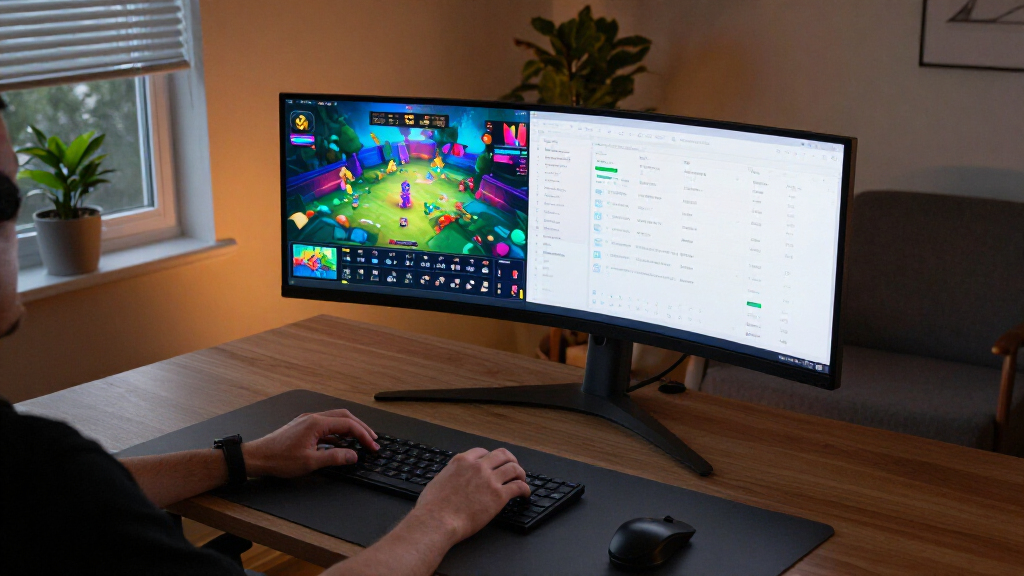
For larger workspaces, the guide names the Samsung Odyssey G9 and Z-Edge UG49W, both 49-inch, 5120-by-1440 displays, suited to the same broad-screen needs covered in this ultrawide productivity guide. The Samsung is listed at 144Hz and the Z-Edge at up to 165Hz. Their 32:9 format offers a broad desktop, but the guide cautions that the Odyssey’s 1000R curve can make it a poor fit for shallow desks. The source does not provide comparable measurements of desk depth or detailed multi-device testing.
Several 34-inch models target buyers who prioritize refresh rate or price. The CRUA WQHD is listed at 165Hz, the SANSUI UWQHD at 200Hz and the Sceptre WQHD at up to 180Hz. The Samsung ViewFinity S50GC is listed at 100Hz and 3440-by-1440 resolution. The guide also includes an LG 34-inch WFHD IPS model with 2560-by-1080 resolution, and the LG 34WR55QK-B with 3440-by-1440 resolution and USB-C power delivery up to 65 watts.
Nine ultrawide picks for work and gaming
The guide compares monitors by size, refresh rate and connectivity. Its recommendations are editorial, with no prices or independent test results provided.
Pick by your setup
The guide groups its choices around different needs, rather than ranking every monitor by measured performance.
Dell S3425DW
The guide’s overall pick, with 120Hz and USB-C power delivery up to 65 watts for laptop connectivity.
49-inch displays
Samsung Odyssey G9 and Z-Edge UG49W offer 5120-by-1440 resolution and a wide 32:9 desktop.
34-inch options
Listed rates include 165Hz for CRUA, 200Hz for SANSUI and up to 180Hz for Sceptre.
Size brings tradeoffs
A broader screen can replace a dual-monitor setup, but needs more room and can ask more of a gaming PC.
- More compact fit for many desks
- Most WQHD picks list 3440-by-1440 resolution
- LG WFHD option uses 2560-by-1080
- 5120-by-1440 broad desktop
- Check desk width and depth
- Check graphics support at native resolution
Compare what matters
Connectivity, panel type and desk fit can matter as much as headline refresh rates.
| Need | Guide points to | Buyer check |
|---|---|---|
| Laptop connection | Dell and LG 34WR55QK-B | Confirm USB-C power and data needs |
| Large curved screen | Samsung Odyssey G9, 1000R | Measure available desk depth |
| Viewing angles | LG WFHD IPS model | Compare exact model specifications |
Before you buy
Use the guide to narrow options, then verify the details for the exact model.
- Check current price and availability
- Confirm resolution, refresh rate, ports and stand adjustments
- Look for independent testing if image quality or motion performance is decisive
Matching Screen Size to Desk Space
Ultrawide displays can replace a dual-monitor arrangement or give games a wider field of view, but the format brings practical tradeoffs. A 49-inch 32:9 screen provides substantially more horizontal workspace than a 34-inch 21:9-class display, while also requiring more room and a compatible graphics setup for gaming at its native resolution.
Connectivity and panel type can matter as much as headline refresh rates. The guide points to USB-C power delivery on the Dell and one LG model for laptop users, while its LG WFHD IPS choice favors viewing angles over the higher listed contrast ratios of VA options. These distinctions help readers narrow choices, but they do not establish which screen performs best under measured conditions.
Popular right now

Dyson V15 Detect Cordless Vacuum

Bose QuietComfort Wireless Noise-Cancelling Headphones, Sandstone

Shark Rotator Lift-Away Upright Vacuum with DuoClean PowerFins, Wine Purple, LA702
As an affiliate, we earn on qualifying purchases.
Nine Models Across Three Sizes
The source groups the recommendations around screen size, resolution, refresh rate, connectivity and use case. Seven of its nine picks are 34-inch models; two are 49-inch models. Most of the 34-inch WQHD listings use 3440-by-1440 resolution, while the LG WFHD option is lower at 2560-by-1080. The two 49-inch screens are listed at 5120-by-1440.
The recommendations also distinguish between flatter and more curved screens. The guide says curves around 1000R to 1500R can support an immersive gaming setup, while flatter designs may be better suited to office work such as spreadsheets. Its descriptions are editorial guidance; the supplied material does not include a methodology, controlled tests or user survey backing those assessments.
The source discloses that it was created with AI assistance and that qualifying purchases may generate affiliate commissions. That disclosure is relevant when weighing its recommendations. The supplied material contains product specifications and pros and cons for the Dell, but does not include complete detailed reviews for all nine models.
“The Dell 34 Plus USB-C Curved Monitor stands out as the best overall pick because it balances 120Hz refresh rates with a versatile USB-C hub.”
— Thorsten Meyer AI buying guide
Testing and Price Details Are Missing
The supplied source does not state when the guide was published, provide current prices, or identify price changes over time. Although the headline frames the list for 2027, the provided material does not explain whether each model will remain available or whether its specifications and availability have been checked for that year.
It is also unclear how the guide assessed image quality, motion handling, ergonomics or color uniformity. The source gives some specifications, but several entries lack a refresh rate, contrast ratio or full resolution details. Its qualitative claims about color accuracy, stand adjustability and gaming suitability are not accompanied by benchmark results or a disclosed test procedure.
Check Current Listings Before Buying
Readers considering a purchase should compare current manufacturer specifications and retailer listings for the exact model, including price, refresh rate, ports and stand adjustments. The supplied guide does not report a forthcoming review, product launch or update, so no next publication milestone can be confirmed.
Before choosing a 49-inch model, buyers can measure available desk depth and width and check whether their computer supports the display’s native resolution at the desired refresh rate. Laptop users comparing the Dell and LG options should confirm the USB-C power and data requirements of their own devices.
Key Questions
Which monitor does the guide recommend for mixed work and gaming?
It names the Dell 34 Plus S3425DW as its best overall pick, citing a 120Hz refresh rate, a 3440-by-1440 VA panel and USB-C power delivery up to 65 watts. That recommendation is the guide’s assessment; the supplied source does not include independent test results.
Which listed monitors have a 49-inch screen?
The Samsung Odyssey G9 and Z-Edge UG49W are both listed as 49-inch, 5120-by-1440 displays. The guide lists refresh rates of 144Hz and up to 165Hz, respectively.
What should buyers know about the Odyssey G9’s curve?
The guide lists a 1000R curve and says the screen needs a deep desk. It does not provide a minimum desk-depth measurement, so buyers should check the display’s current product specifications and measure their available space.
Does the source establish which monitor is the best value?
No price comparison or current price data is supplied. The guide labels the Samsung ViewFinity S50GC a productivity value pick and points to the CRUA and Sceptre as lower-cost options, but readers cannot verify relative value from the provided material alone.
Source: Thorsten Meyer AI