Choosing between Amazon Echo and Google Nest means choosing which assistant will connect your smart home. Both can control compatible lights, plugs, thermostats, cameras, and other devices. Echo pairs Alexa with a broad range of models and third-party products; Nest pairs Google Assistant with Google services and Google’s home products.

Get everyday essentials delivered free with Prime
- Fast, free delivery on millions of items
- Prime Video, Amazon Music and more included
- Member-only deals all year
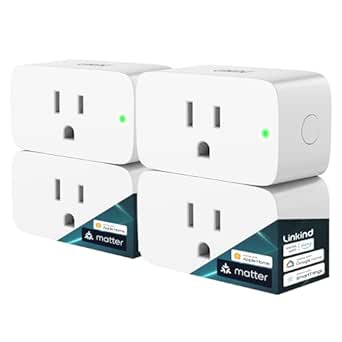
Linkind Matter Smart Plug, 4-Pack
- ✔ Pack size: 4 plugs
- ✔ Connectivity: Matter and 2.4 GHz Wi-Fi
- ✔ Compatible platforms: Apple Home, Alexa, Google Home, SmartThings, AiDot

Kasa Smart Plug HS103P4 Wi-Fi Outlet, 4-Pack
- ✔ Pack size: 4 plugs
- ✔ Connectivity: 2.4 GHz Wi-Fi
- ✔ Voice assistants: Amazon Alexa and Google Assistant

Amazon Echo Show 5 Smart Display, Charcoal
- ✔ Display: 5.5-inch touchscreen
- ✔ Camera: 2 MP with built-in shutter
- ✔ Speaker: 1.75-inch full-range speaker
Start with what your household already uses. Echo is a strong fit if you want more device options, plan to combine brands, or use Amazon services. Nest is a natural choice if you rely on Android, Google Calendar, YouTube, or Google Home. Before buying, check that your specific devices and desired features work with the assistant you choose.
At a Glance
| Criteria | Amazon Echo | Google Nest | Winner |
|---|---|---|---|
| Device and accessory choice | Broad Echo range, with speakers, displays, and other Alexa devices. | A smaller, more Google-centered range of speakers, displays, and home products. | A |
| Smart home setup and routines | Alexa supports routines and a large ecosystem of compatible devices. | Google Home supports routines and controls for compatible devices. | A |
| Voice assistant and services | Alexa works closely with Amazon services and a wide set of third-party skills. | Google Assistant fits naturally with Google services and Android. | Depends |
| Compatibility | Strong choice across many brands; check device and feature support before buying. | Works well with Google Home-compatible products; feature support varies by model. | A |
| Privacy and controls | Settings and voice history controls are available, but need active review. | Google account settings include voice and activity controls; review them during setup. | Tie |
| Price and value | Many entry-level choices; value improves when Alexa controls several devices. | Worth paying for when Google services and existing Nest products make it more useful. | Depends |
Linkind Matter Smart Plug, 4-Pack
The Linkind 4-pack is our lead choice for a home where smart devices may need to work across more than one platform. Its Matter compatibility includes Apple Home, Alexa, Google Home, and SmartThings, giving it a wider stated platform range than the Kasa HS103P4. You can control connected appliances remotely or by voice and create schedules and timers, which makes everyday routines easier to automate without replacing the appliance itself.That flexibility comes with setup conditions. The plugs need 2.4 GHz Wi-Fi and IPv6, and several of the named platforms require a Matter-certified controller. The AiDot app can be used without a hub, but buyers choosing Apple Home, Alexa, Google Home, or SmartThings should confirm they have the required controller. Compared with Kasa, Linkind is a better fit when broader interoperability matters more than the most direct setup; its local-network control can also keep supported control available when internet access is down. Its 15 A / 1800 W capacity and short-circuit and overload protection add useful appliance-control safeguards, though buyers still need to stay within the rating.We would choose Linkind for a household that wants to preserve options as its smart home grows. We would skip it if a buyer wants a plug that works only through a simple app and voice setup without checking network or controller requirements; in that case, Kasa is more straightforward.
Pros:
- Matter support spans Apple Home, Alexa, Google Home, and SmartThings.
- Remote control, voice commands, schedules, and timers support everyday automation.
- Local-network operation can support control when internet access is unavailable.
- Short-circuit and overload protection with a stated 15 A capacity.
Cons:
- Requires 2.4 GHz Wi-Fi and IPv6.
- A Matter-certified controller is required for several listed platforms.
- Platform setup takes more checking than Kasa’s hub-free Wi-Fi approach.
Best for: Households using or planning to use Matter-compatible platforms and comfortable checking controller and network requirements.
Not ideal for: Buyers who want the simplest hub-free setup or whose Wi-Fi network does not meet the 2.4 GHz and IPv6 requirements.
Bottom line: Linkind earns the top spot for its broad Matter compatibility, provided your network and chosen platform meet its setup requirements.
“Linkind earns the top spot for its broad Matter compatibility, provided your network and chosen platform meet its setup requirements.”
Kasa Smart Plug HS103P4 Wi-Fi Outlet, 4-Pack
If your smart home already runs on Alexa or Google Assistant, the Kasa HS103P4 makes outlet control comparatively simple. Connect it to 2.4 GHz Wi-Fi, use the Kasa app to control appliances remotely, and set schedules or timers. No hub is required, which makes Kasa an easier fit than Linkind for buyers who do not want to check for a Matter controller before getting started.The tradeoff is a narrower platform list. Kasa’s stated voice compatibility covers Alexa and Google Assistant, while Linkind also names Apple Home and SmartThings through Matter. So the Kasa pack is a practical choice for a home committed to those two assistants, but less adaptable if you expect to mix platforms or change systems later. Its four outlets, 15 A / 1800 W rating, and UL certification make it a straightforward appliance-control option. It still needs 2.4 GHz Wi-Fi, and the 15 A limit means it is not suitable for loads beyond its stated capacity.Compared with the Echo Show 5, Kasa focuses on controlling appliances rather than adding a screen, speaker, or camera. That makes it the more direct pick when you simply want to automate lamps or other compatible appliances around the home. Skip it if Apple Home or SmartThings support is essential, or if you want a central display for smart home information.
Pros:
- Four plugs provide multiple appliance-control points.
- Works with Alexa and Google Assistant through the Kasa app.
- No hub is required for setup.
- UL certified and rated up to 15 A / 1800 W.
Cons:
- Requires a 2.4 GHz Wi-Fi connection.
- Its stated assistant support is narrower than Linkind’s Matter platform range.
- The 15 A limit rules out appliances that exceed the rating.
Best for: Alexa or Google Assistant households that want app and voice control for several outlets without adding a hub.
Not ideal for: Buyers who need Matter, Apple Home, or SmartThings compatibility, or who need to control appliances above the 15 A limit.
Bottom line: Kasa is the simpler hub-free choice for Alexa and Google homes, though Linkind is more flexible across platforms.
“Kasa is the simpler hub-free choice for Alexa and Google homes, though Linkind is more flexible across platforms.”
Amazon Echo Show 5 Smart Display, Charcoal
The Echo Show 5 is the only pick here that gives us a screen for interacting with a smart home. Its 5.5-inch touchscreen can put compatible device controls and at-a-glance information in a shared space, while the built-in speaker handles audio and the 2 MP camera supports video calls and checking compatible cameras or doorbells. It makes the most sense when a small display and Alexa access would be useful together, such as on a bedside table or kitchen counter.That added hardware separates it from both plug packs, but also makes it a less direct purchase if the goal is simply to switch appliances remotely. The Linkind and Kasa packs each include four outlets for controlling several appliances; the Echo Show 5 is a room device whose smart home control depends on compatible devices and Alexa. Its dual-band Wi-Fi differs from the plugs’ 2.4 GHz-only requirement, but it does not support ad-hoc or peer-to-peer Wi-Fi networks. Some skills and services may also require subscriptions or additional fees.Privacy-conscious buyers get a microphone and camera off button plus a built-in camera shutter. Those controls help address concerns about having a camera-equipped display in a shared room, though buyers who do not want a camera or screen should choose one of the plugs instead. The Echo Show 5 also uses recycled materials in its fabric and aluminum components and recyclable packaging, but its Alexa focus makes it a narrower smart home choice than Linkind for households built around multiple ecosystems.
Pros:
- Compact touchscreen provides a visible point for Alexa and compatible smart home controls.
- Built-in speaker and camera add media and video-call functions.
- Camera shutter and microphone and camera off button provide privacy controls.
- Uses recycled materials in specified components and recyclable packaging.
Cons:
- Alexa-centered controls are less flexible across platforms than Linkind’s Matter support.
- Some skills and services may require subscriptions or additional fees.
- Does not support ad-hoc or peer-to-peer Wi-Fi networks.
Best for: Alexa users who want a compact touchscreen for compatible smart home controls, media, information, and video calls.
Not ideal for: Buyers who only need remote outlet control, prefer a screen-free device, or want broad platform flexibility beyond Alexa.
Bottom line: The Echo Show 5 is the best fit when a compact Alexa screen adds value in your room, but it cannot replace the outlet packs for controlling multiple appliances.
“The Echo Show 5 is the best fit when a compact Alexa screen adds value in your room, but it cannot replace the outlet packs for controlling multiple appliances.”
As an Amazon Associate we earn from qualifying purchases.
Key Differences
Choose Echo if having more models and third-party options matters most. Its range makes it easier to find a speaker or display for a particular room and budget, and Alexa supports many compatible products. You still need to check the exact model and features: compatibility labels do not guarantee that every function works through every assistant.
Choose Nest if Google services and devices already shape your household’s routines. Google Assistant and Google Home can make calendars, media, and voice commands feel familiar from the start. Nest’s range is more focused, which matters less when its available devices meet your needs. In either ecosystem, the best value comes from a device that works with the services and products you actually use.
If you are starting from scratch and want broad choice, Echo is the stronger default. If your home already runs on Google, Nest is likely the more convenient fit. Check compatibility for your planned devices, then choose the assistant your household will use most.
Detailed Comparison
Device and accessory choice (Amazon Echo wins — moderate)
Echo offers the wider selection of speakers, displays, and Alexa-compatible products. That makes it easier to match a device to a room or budget. Nest covers common home needs, but its more focused range gives you fewer options. Choose Echo when selection is a priority; choose Nest when its models fit your setup.
Smart home setup and routines (Amazon Echo wins — moderate)
Echo has an edge if you want to combine brands and build routines across a varied setup. Google Home also supports routines and everyday device controls, so Nest can handle common tasks such as switching lights or adjusting a thermostat. Choose Alexa for broader flexibility; choose Nest when Google Home already organizes your devices.
Voice assistant and services (major difference)
Choose Alexa if you use Amazon services or prefer its available skills. Choose Google Assistant if your household relies on Android and Google services. This choice can shape everyday convenience because the assistant that fits your familiar commands and services is the one you are more likely to use. Neither is the right pick for everyone.
Compatibility (Amazon Echo wins — moderate)
Echo is a strong starting point if you want to choose from a broad range of third-party smart home products. Google Home supports many devices as well, but compatibility can differ by model and feature. Check your specific lights, cameras, sensors, and automations before choosing. Nest may be simpler for an existing Google Home setup; Echo may suit a mixed-brand setup better.
Privacy and controls (moderate difference)
Neither product family has a clear advantage here. Both use microphones and account-connected services, and both provide settings for managing voice or activity data. Your choice depends on the settings and features you enable, as well as where you place the devices. Review microphone and data controls during setup, especially for devices in private rooms.
Price and value (moderate difference)
The better value depends on the model and the features you will use. Echo’s range offers more entry-level options for buyers who want to start with Alexa. Nest can be worth the price when Google integration or existing devices make it more useful. For either brand, a premium model is hard to justify if you only need basic voice control in one room.
Amazon Echo: Pros and Cons
Pros:
- Broad choice of device types and price points.
- Large Alexa ecosystem for smart home products and routines.
- Good fit for households using Amazon services.
Cons:
- The large range can make model selection confusing.
- Compatibility and features vary across third-party devices.
- Less compelling if the household relies mainly on Google services.
Google Nest: Pros and Cons
Pros:
- Natural fit for Android and Google services.
- Convenient for households already using Google Home or Nest products.
- Straightforward choice for people who prefer Google’s assistant.
Cons:
- A more focused device range than Echo.
- The Google-centered ecosystem may be less convenient for Amazon-first households.
- Exact device and feature compatibility still needs checking.
Who Should Choose What
Choose Amazon Echo if:
- You want the widest choice of Alexa-compatible devices and formats.
- Your smart home mixes brands and you plan to create Alexa routines.
- Your household uses Amazon services and prefers Alexa.
Choose Google Nest if:
- You use Android, Google services, or Google Home every day.
- You already own Nest or Google Home products and want one connected setup.
- Your household finds Google Assistant’s commands and services more familiar.
Skip both if: Neither may suit you if you do not want voice-controlled, account-connected devices; use local controls or a hub and devices designed around your privacy and connection requirements.
Value for Money
Match the price to how you will use the device. A basic Echo or Nest speaker can handle timers, music, and simple light control. Pay more for a display or higher-end model if you will use its screen, audio, or room-specific features regularly. Echo offers more low-cost ways into Alexa and can suit homes adding devices from several brands. Nest can earn its price in a Google household where it connects to services and products already in use. Compare specific models and confirm compatibility before buying on discount alone.
Final Verdict
Choose Amazon Echo if you are starting from scratch and want more device options for a mixed-brand smart home. Choose Google Nest if your household already uses Google services, Android, or Nest products; that existing setup makes Google Assistant the more natural fit. Let the assistant your household will use daily decide the choice. Compare the specific models, pay for features you expect to use, and confirm compatibility with your devices.
Frequently Asked Questions
Is Amazon Echo or Google Nest better for a smart home?
Echo suits buyers who want broad device choice and Alexa routines. Nest suits homes that already rely on Google services or Nest products. Check compatibility with your devices before choosing.
Can Amazon Echo and Google Nest control the same smart devices?
Many smart home devices support both Alexa and Google Home, but support differs by product and feature. Check the manufacturer’s compatibility information for the exact model and functions you plan to use.
Should I pay more for a smart display?
Pay more if you will regularly use the screen for video, visual controls, or other supported features. If your needs are timers, music, and basic voice commands, an entry-level speaker is usually better value.
Which is better for Android users?
Google Nest is generally the more natural match for Android users who also rely on Google services. Echo can still control compatible devices, so choose it if Alexa’s ecosystem or Amazon services better match the rest of your home.