Podcast microphone kits bundle a mic with accessories or recording gear, but the right choice depends on how many people you record and how much control you need. I name the FIFINE AmpliTank K688CT my best overall pick for its USB/XLR flexibility and dynamic mic design, while the Movo 4-Person Bundle stands out for group shows and the MAONO PD200W Bundle for Two for wireless two-person recording. The main tradeoff is simplicity versus expandability: an all-in-one mixer kit can be convenient, while a USB/XLR mic may leave more room to upgrade. Camera, phone, and multi-mic bundles serve different workflows, so bundled gear is only useful when it fits your recording setup. Read on for the full comparison, buying advice, and recommendations by podcasting need.

Get everyday essentials delivered free with Prime
- Fast, free delivery on millions of items
- Prime Video, Amazon Music and more included
- Member-only deals all year
Complete the kit


Key Takeaways
- USB/XLR flexibility separates the strongest upgrade-minded picks: the FIFINE AmpliTank K688CT and MAONO A04 Gen2 can suit a starter setup while offering a path to different recording gear.
- Dynamic microphones make more sense for untreated rooms: the FIFINE AM8T and K688CT are better fits for managing nearby room noise than the condenser-focused A04 kits.
- Speaker count changes the whole buying decision: the Movo 4-Person Bundle is purpose-built for group recording, while the Movo two-person bundle and MAONO PD200W Bundle for Two address smaller casts.
- Bundled extras matter only when they match the workflow: the Movo Video Podcast Bundle adds cameras and interface gear, but solo audio podcasters may not need that equipment.
- Portable and wireless kits trade some conventional setup simplicity for placement freedom: the Movo PodPro-TH and MAONO PD200W models suit phone, computer, or less fixed recording arrangements.
| MAONO A04 USB Condenser Microphone Kit |  | Best Beginner USB Kit | Connectivity: USB, USB Type-C | Microphone type: Large-diaphragm condenser | Polar pattern: Cardioid | VIEW LATEST PRICE | See Our Full Breakdown |
| FIFINE AmpliGame AM8T XLR/USB Dynamic Gaming Microphone Kit with Boom Arm |  | Best Dynamic Kit for a Flexible Setup | Connectivity: USB, XLR | Microphone type: Dynamic | Polar pattern: Cardioid | VIEW LATEST PRICE | See Our Full Breakdown |
| Podcast Equipment Bundle for Two with Audio Mixer, Voice Changer, and Condenser Microphones |  | Best Two-Person Kit with Live Effects | Connectivity: Bluetooth, USB | Microphone type: Condenser | Connector type: XLR | VIEW LATEST PRICE | See Our Full Breakdown |
| Movo 2-Person USB Podcast Bundle with Two Condenser Microphones and USB Hub |  | Best for Portable Two-Person Recording | Model: UMX-1+UM700x2 | Connectivity: USB | Included microphones: 2 UM700 USB condenser microphones | VIEW LATEST PRICE | See Our Full Breakdown |
| MAONO A04 Gen2 USB/XLR Condenser Microphone Kit |  | Best Upgrade-Ready Condenser Kit | Connectivity: USB, USB Type-C, XLR | Microphone type: Studio condenser | Polar pattern: Cardioid | VIEW LATEST PRICE | See Our Full Breakdown |
| Movo Video Podcast Bundle with USB Audio Interface, 2 XLR Microphones, 2 4K Cameras, and Boom Arms |  | Best for Two-Person Video Podcasts | Microphones: 2 cardioid XLR dynamic microphones | Microphone frequency response: 40 Hz–16 kHz | Cameras: 2 4K UHD cameras | VIEW LATEST PRICE | See Our Full Breakdown |
| FIFINE AmpliTank K688CT USB/XLR Dynamic Podcast Microphone Kit with Boom Arm | 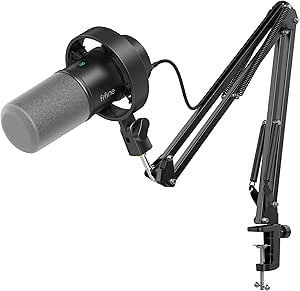 | Best Value for a Solo Desk Setup | Microphone type: Dynamic | Connectivity: USB, XLR | Polar pattern: Cardioid, unidirectional | VIEW LATEST PRICE | See Our Full Breakdown |
| MAONO PD200W Hybrid Wireless Podcast Microphone |  | Best for Wireless Flexibility | Microphone type: Dynamic | Connectivity: Wireless, USB, XLR | Polar pattern: Cardioid, unidirectional | VIEW LATEST PRICE | See Our Full Breakdown |
| Movo PodPro-TH Portable Podcast Equipment Bundle for Phones and Computers |  | Best Portable Two-Person Kit | Audio interface: MDX-2 dual-channel USB audio interface | Microphones: 2 CastMic XLR dynamic microphones | Microphone frequency response: 40 Hz–16 kHz | VIEW LATEST PRICE | See Our Full Breakdown |
| MAONO PD200W Hybrid Wireless Podcast Microphone Bundle for Two |  | Best Wireless Kit for Two Hosts | Microphones included: 2 dynamic microphones | Connectivity: Wireless, USB, XLR | Pickup pattern: Cardioid, unidirectional | VIEW LATEST PRICE | See Our Full Breakdown |
| BM-800 Podcast Recording Bundle with Voice Changer and Live Sound Card (AM100-V8) |  | Best for Voice Effects on a Budget | Microphone: BM-800 condenser microphone | Pickup pattern: Cardioid | Connectivity: USB | VIEW LATEST PRICE | See Our Full Breakdown |
| GO Podcast Equipment Bundle – F998 Audio Mixer with BM800 Microphone | 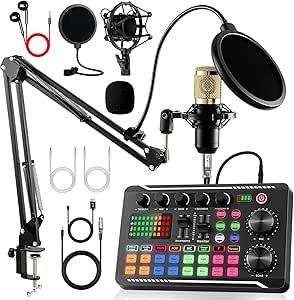 | Best for Mixer Controls and Effects | Mixer: F998 | Microphone: BM800 cardioid | Background effects: 16 | VIEW LATEST PRICE | See Our Full Breakdown |
| J.I.Y Podcast Recording Bundle with Condenser Microphones, Bluetooth Sound Card, DSP Effects, and Boom Arms |  | Best for Headphone Monitoring | Microphone type: Studio condenser | Connectivity: Auxiliary, Bluetooth 5.1, and USB | Channels: 2 | VIEW LATEST PRICE | See Our Full Breakdown |
| Movo 4-Person Podcast Equipment Bundle with 4-Channel USB Audio Interface, 4 Dynamic Microphones, and 4 Boom Arms |  | Best for Four-Person Table Podcasts | Microphones: Four CastMic dynamic microphones | Boom arms: Four adjustable boom arms | Interface: UMX-2 USB audio interface | VIEW LATEST PRICE | See Our Full Breakdown |
| Podcast Equipment Bundle with Microphones, Audio Interface, and Voice Changer |  | Best for Two-Person Multi-Device Recording | Included microphones: Two condenser microphones | Channels: 2 | Connectivity: USB | VIEW LATEST PRICE | See Our Full Breakdown |
| podcast microphone kit | Connectivity |
|---|---|
| MAONO A04 USB Condenser Microp | USB, USB Type-C |
| FIFINE AmpliGame AM8T XLR/USB | USB, XLR |
| Podcast Equipment Bundle for T | Bluetooth, USB |
| Movo 2-Person USB Podcast Bund | USB |
| MAONO A04 Gen2 USB/XLR Condens | USB, USB Type-C, XLR |
| Movo Video Podcast Bundle with | XLR, USB-C |
| FIFINE AmpliTank K688CT USB/XL | USB, XLR |
| MAONO PD200W Hybrid Wireless P | Wireless, USB, XLR |
| Movo PodPro-TH Portable Podcas | — |
| MAONO PD200W Hybrid Wireless P | Wireless, USB, XLR |
| BM-800 Podcast Recording Bundl | USB |
| GO Podcast Equipment Bundle | USB, Bluetooth, and 3.5 mm jack |
| J.I.Y Podcast Recording Bundle | Auxiliary, Bluetooth 5.1, and USB |
| Movo 4-Person Podcast Equipmen | USB-C |
| Podcast Equipment Bundle with | USB |
More Details on Our Top Picks
MAONO A04 USB Condenser Microphone Kit
The MAONO A04 is a straightforward starting point for a solo host who wants the microphone and desk setup in one package. Its USB plug-and-play connection avoids a separate interface, while the boom arm, shock mount, pop filter, and windscreen cover the basic positioning and plosive-control needs of a home podcast desk. Compared with the MAONO A04 Gen2, this model lacks XLR connectivity and software-based audio adjustments, so it is less adaptable if you later add an interface or want built-in processing. Its condenser design and 2–6-inch recommended distance also suit a treated, relatively quiet space better than a noisy room. The tradeoffs are limited upgrade options and a desk clamp that fits surfaces under 2.1 inches thick; it also does not work with Xbox.
Pros:- USB setup needs no additional driver or sound card.
- Includes an adjustable arm, shock mount, pop filter, and windscreen.
- Cardioid pickup pattern focuses capture toward the speaker.
- Works with computers, PlayStation consoles, and mobile phones.
Cons:- No XLR connection for use with an audio interface or mixer.
- Desk clamp only fits desktops less than 2.1 inches thick.
- Not compatible with Xbox or Maono Link.
Best for: First-time solo podcasters recording at a computer who want a complete arm-and-filter setup without buying an audio interface.
Not ideal for: Hosts planning an XLR-based studio upgrade, recording in a noisy room, or using Xbox; the kit is USB-only and the condenser can pick up room sound.
- Connectivity:USB, USB Type-C
- Microphone type:Large-diaphragm condenser
- Polar pattern:Cardioid
- Sampling rate and bit depth:192 kHz/24-bit
- Frequency range:30 Hz–16 kHz
- Signal-to-noise ratio:70 dB
- Recommended distance:2–6 inches
- Included accessories:Adjustable scissor arm, shock mount, pop filter, foam windscreen, boom arm base, USB-A/USB-C to USB-B cable
Our verdict“Choose the A04 for an uncomplicated solo USB setup, but pick the A04 Gen2 if you want XLR connectivity and USB-mode processing.”
FIFINE AmpliGame AM8T XLR/USB Dynamic Gaming Microphone Kit with Boom Arm
The AM8T suits podcasters who want a dynamic mic with both USB and XLR paths. USB makes it usable directly with a computer, while XLR gives it a route into a mixer or interface as the recording setup grows. That flexibility sets it apart from the USB-only MAONO A04, and its on-mic mute, gain, and headphone-volume controls make quick adjustments easier during a live recording. The dynamic design is a practical fit for a desk that is not acoustically treated, though mic placement still matters. This kit includes a boom arm, clamp, and windscreen, but no XLR cable, so the second connection path requires an extra purchase. The RGB lighting can be turned off, yet the gaming-style features matter less to a podcast-only buyer than the useful controls and upgrade options.
Pros:- Offers both direct USB and XLR connectivity.
- Dynamic cardioid design suits close-mic recording in a less-treated room.
- On-mic mute, gain, headphone-volume controls, and monitoring jack.
- Includes a boom arm, desk clamp, and windscreen.
Cons:- XLR cable is not included.
- Desk clamp only fits desktops less than 2 inches thick.
- RGB and gaming-oriented styling may be unnecessary for a podcast-focused setup.
Best for: Solo podcasters who want a dynamic microphone for a home desk and expect to move from direct USB recording to an XLR interface later.
Not ideal for: Buyers seeking a condenser microphone, a complete XLR-ready package, or a kit whose desk clamp fits surfaces 2 inches thick or more.
- Connectivity:USB, XLR
- Microphone type:Dynamic
- Polar pattern:Cardioid
- Frequency response:50 Hz–16 kHz
- Signal-to-noise ratio:80 dB
- On-mic features:Mute button, gain control, headphone jack, headphone-volume control
- Included accessories:Boom arm stand, C-clamp, 8.2 ft USB-to-USB-C cable, windscreen
- XLR cable:Not included
Our verdict“Pick the AM8T if you want dynamic-mic handling and a clear USB-to-XLR upgrade path, and plan to supply your own XLR cable.”
Podcast Equipment Bundle for Two with Audio Mixer, Voice Changer, and Condenser Microphones
This bundle is aimed at two people who want to record or stream through a shared mixer rather than connect two standalone USB microphones to a computer. It includes two condenser microphones, two boom arms, and a sound card with DSP noise reduction, voice effects, and instrument input. That gives it more live-production options than the simpler Movo 2-Person USB Podcast Bundle, whose supplied setup centers on USB microphones and monitoring. The added mixer features can support gaming streams or music alongside conversation, but they also mean more setup and more controls to learn than a single-mic kit such as the FIFINE AM8T. Bluetooth and USB connectivity broaden device options, though the supplied description notes that the battery should be charged before use and a driver may need customer-support help if automatic installation fails.
Pros:- Includes two condenser microphones and two boom arms for co-hosts.
- Mixer offers DSP noise reduction and voice effects.
- Instrument input supports sources such as guitars and basses.
- USB and Bluetooth connectivity support compatible computers and smartphones.
Cons:- More mixer functions can add setup complexity compared with the Movo USB bundle.
- Battery should be fully charged before first use or after long storage.
- Driver installation may require help from customer support.
Best for: Two-person podcast or livestream teams who want a shared mixer with voice effects, noise reduction, and an instrument input.
Not ideal for: Solo beginners who want a simple plug-and-play microphone, or hosts who prefer a minimal setup with clearly documented driver installation.
- Connectivity:Bluetooth, USB
- Microphone type:Condenser
- Connector type:XLR
- Number of channels:2
- Signal-to-noise ratio:78 dB
- Power source:Battery powered
- Included components:Sound card, 2 condenser microphones, 2 boom arms, earphone, shock holders, pop filters, foam covers, XLR cables, USB cable, audio cables
- Additional mixer features:DSP noise reduction, voice effects, instrument input
Our verdict“Choose this bundle for a two-person show that benefits from live effects and instrument input, not for the simplest route to a clean conversation recording.”
Movo 2-Person USB Podcast Bundle with Two Condenser Microphones and USB Hub
The Movo bundle is the most direct choice here for recording two people over USB without building an XLR mixer setup. Its two UM700 microphones and four-port USB hub provide a shared connection point, while the 3.5 mm headphone output supports real-time monitoring. A hard-shell case gives it a practical advantage over the desk-focused MAONO A04 when the kit needs to travel between interview locations. It is also less effects-oriented than the two-person Podcast Equipment Bundle with Audio Mixer, making the recording path simpler if you do not need voice changing or instrument input. The hub can support up to four USB microphones, but only two are supplied, and stable operation requires a separate 5V USB-C power input. That extra power need slightly reduces its grab-and-go simplicity.
Pros:- Includes two USB condenser microphones and a hard-shell carrying case.
- Four-port hub supports up to four USB microphones.
- 3.5 mm headphone output enables real-time monitoring.
- Plug-and-play compatibility with Mac, Windows, and popular recording apps.
Cons:- Requires a separate 5V USB-C power input for stable hub operation.
- Only two microphones are included despite the hub supporting up to four.
- USB-only design does not provide an XLR upgrade path.
Best for: Two-person interviewers, educators, or mobile podcasters who want two USB microphones, headphone monitoring, and a protective case.
Not ideal for: Users who need a full mixer with live voice effects or instrument inputs, or buyers unwilling to provide separate USB-C power for the hub.
- Model:UMX-1+UM700x2
- Connectivity:USB
- Included microphones:2 UM700 USB condenser microphones
- Hub ports:4
- Headphone output:3.5 mm
- Number of channels:2
- Included components:UMX-1 USB audio interface, two UM700 microphones, hard-shell carrying case
- Power requirement:Separate 5V USB-C input for stable hub operation
Our verdict“Choose the Movo for portable two-person USB recording and monitoring, but look to the mixer bundle if live effects or instrument inputs matter more.”
MAONO A04 Gen2 USB/XLR Condenser Microphone Kit
The A04 Gen2 keeps the approachable USB kit format but adds an XLR connection, giving solo podcasters more room to change their recording chain later. Its included software offers gain, EQ, compression, limiting, and noise reduction in USB mode, a meaningful step beyond the original MAONO A04, which is simpler but lacks those listed software controls. The supplied arm, shock mount, pop filter, and windscreen make it a complete desk package, while the 16 mm cardioid condenser capsule suits close-mic speech in a reasonably quiet room. The flexibility comes with boundaries: software processing works only over USB, and XLR use requires phantom power and a separately supplied cable. Compared with the dynamic FIFINE AM8T, this condenser kit gives more USB-mode processing but is less compelling for buyers prioritizing a dynamic mic.
Pros:- Supports both USB plug-and-play and XLR connections.
- USB software includes gain, EQ, compression, limiting, and noise reduction.
- Includes an adjustable arm, shock mount, pop filter, and windscreen.
- Cardioid 16 mm condenser capsule is suited to close-mic speech.
Cons:- XLR cable is not included.
- XLR mode requires phantom power.
- Software features are available only in USB mode, and the microphone is not compatible with Xbox.
Best for: Solo podcasters who want a ready-to-use USB condenser today and the option to connect to an XLR interface or mixer later.
Not ideal for: Xbox users, buyers who need software processing over XLR, or anyone without phantom power and an XLR cable for interface use.
- Connectivity:USB, USB Type-C, XLR
- Microphone type:Studio condenser
- Polar pattern:Cardioid
- Capsule size:16 mm
- Sampling rate and bit depth:192 kHz/24-bit
- Frequency response:30 Hz–16 kHz
- Impedance:200 ohm
- XLR requirements:XLR cable not included; phantom power required
Our verdict“Pick the A04 Gen2 if you want a condenser kit with USB software controls now and an XLR option for a later studio setup.”
Movo Video Podcast Bundle with USB Audio Interface, 2 XLR Microphones, 2 4K Cameras, and Boom Arms
I’d choose this kit when a co-hosted show needs video as well as two separate mic positions. It combines two cardioid XLR dynamic microphones, boom arms, a two-channel USB interface, and two 4K cameras, so the core recording setup comes in one bundle. Compared with the Movo PodPro-TH, this option favors a camera-ready desk or studio setup over portability: the PodPro-TH includes headphones and a battery-powered interface, while this kit adds cameras and boom arms.
The dynamic mics are suited to emphasizing close voices while limiting some room sound, and USB-C connectivity makes computer recording straightforward. The tradeoff is a larger, more involved setup, and the product data does not specify recording software or setup guidance. I’d skip it if audio-only portability matters more than a two-angle video workflow.
Pros:- Includes two 4K cameras for multi-angle recording
- Two dynamic XLR microphones and boom arms suit co-hosted recording
- Two-channel USB interface supports both microphones
- USB-C connectivity and 48V phantom power
Cons:- No recording software or setup instructions are specified
- Less portable than the battery-powered Movo PodPro-TH
- The two-camera setup calls for more space and equipment management
Best for: Two-person podcast teams recording video interviews at a fixed desk who want cameras, mics, boom arms, and an interface in one kit.
Not ideal for: Solo audio podcasters or mobile interviewers who want a lightweight setup; this bundle’s two cameras and arms add gear they may not need.
- Microphones:2 cardioid XLR dynamic microphones
- Microphone frequency response:40 Hz–16 kHz
- Cameras:2 4K UHD cameras
- Audio interface:2-channel USB audio interface
- Connectivity:XLR, USB-C
- Phantom power:48V
- Included components:2 boom arms, 2 full-size tripods
- Compatible systems:Windows, macOS
Our verdict“Choose this Movo bundle if your two-person podcast needs a complete video-and-audio setup, not a compact audio-only kit.”
FIFINE AmpliTank K688CT USB/XLR Dynamic Podcast Microphone Kit with Boom Arm
For a solo host who wants a mic, arm, and useful controls without assembling a larger studio bundle, the FIFINE AmpliTank K688CT is the focused pick here. USB gives you plug-and-play recording, a mute button, gain and volume controls, and headphone monitoring; switching to XLR opens a path to an audio interface later. That flexibility makes it a simpler starting point than the two-mic Movo PodPro-TH, though the Movo is better equipped for interviews and includes two headphones.
The cardioid dynamic design helps keep attention on a close voice, while the included shock mount and windscreen make the desk setup more practical. The main compromise is that the onboard controls work only over USB, so an XLR user must manage levels and monitoring elsewhere. Check the clamp fit too: it suits desks under two inches thick.
Pros:- USB and XLR connectivity supports a gradual move to interface-based recording
- USB mute, gain, volume, and headphone monitoring controls
- Includes metal boom arm, windscreen, and shock mount
- Cardioid dynamic pickup pattern focuses on close speech
Cons:- Microphone controls are unavailable over XLR
- Desk clamp fits desks under two inches thick
- One channel and one microphone do not suit a two-person kit
Best for: Solo podcasters, streamers, or voice-over beginners who want one dynamic mic with a boom arm and the option to move from USB to XLR.
Not ideal for: Two-host shows or users with desks thicker than two inches; this is a one-microphone kit and its clamp has a stated thickness limit.
- Microphone type:Dynamic
- Connectivity:USB, XLR
- Polar pattern:Cardioid, unidirectional
- Frequency range:50 Hz–16 kHz
- Maximum SPL:120 dB
- Signal-to-noise ratio:80 dB
- Included accessories:Metal boom arm, windscreen, shock mount
- Desk clamp compatibility:Desks under 2 inches thick
Our verdict“Pick the K688CT for a well-equipped solo desk microphone, especially if you want USB now and XLR as an option later.”
MAONO PD200W Hybrid Wireless Podcast Microphone
The MAONO PD200W is the most adaptable single-mic choice in this group: it can connect wirelessly, by USB, or by XLR. That gives a host room to record at a desk, move around, or connect to an interface without replacing the microphone. Compared with the FIFINE K688CT, which also offers USB and XLR but relies on a cable, the MAONO adds wireless freedom and app-based adjustments; the FIFINE is the more straightforward desk kit because it includes a boom arm and shock mount.
Its cardioid pattern, three-stage noise cancellation, and up-to-60-hour battery life with RGB off suit mobile sessions and flexible recording spaces. It can also support two wireless microphones to one receiver with separate tracks. The tradeoffs are that camera and Lightning accessories are sold separately, and the provided product data gives no frequency-response range beyond a 16 kHz upper figure. I’d favor a wired kit if predictable, simple desk recording is the priority.
Pros:- Wireless, USB, and XLR connection options
- Three-stage noise cancellation and cardioid pickup
- Supports two wireless microphones to one receiver with separate tracks
- Up to 60 hours of battery life with RGB lighting off
Cons:- Camera and Lightning accessories are sold separately
- No complete frequency-response range is specified
- The included desktop stand is less flexible than a boom-arm setup
Best for: Hosts who record in different locations or need one microphone to work wirelessly, with a computer over USB, or through an XLR interface.
Not ideal for: Buyers seeking a ready-to-mount desk kit or a fully specified camera connection; accessories such as camera and Lightning adapters are not included.
- Microphone type:Dynamic
- Connectivity:Wireless, USB, XLR
- Polar pattern:Cardioid, unidirectional
- Signal-to-noise ratio:82 dB
- Maximum SPL:128 dB
- Wireless range:Up to 60 m
- Battery life:Up to 60 hours with RGB lighting off
- Included accessories:Desktop stand, USB-C cable, Type-C receiver, Type-C adapter cable
- Software:MaonoLink app; compatible with Mac and Windows
Our verdict“Choose the PD200W if connection flexibility and wireless movement matter more than having a boom arm and a fully specified audio profile.”
Movo PodPro-TH Portable Podcast Equipment Bundle for Phones and Computers
When two people need to record away from a permanent studio, the Movo PodPro-TH offers a more complete audio setup than the single-mic FIFINE K688CT: it includes two XLR dynamic microphones, two headphones, two tabletop stands, and a battery-powered dual-channel interface. Its included USB-A, USB-C, and Lightning cables also make it easier to connect with different computers and mobile devices without building a cable kit separately.
The interface can run for up to eight hours, which suits interviews and travel sessions, but that falls to three hours with 48V phantom power enabled. Unlike the Movo video bundle, this one prioritizes mobile audio recording over cameras and boom arms. One listed specification gives a maximum sample rate of 16 kHz, so I’d check recording-format requirements before choosing it for a workflow that depends on higher sample rates. The listed weight also makes this a packed kit rather than an ultra-light carry.
Pros:- Two microphones, two headphones, and a dual-channel interface form a ready two-person audio kit
- Battery-powered interface supports up to eight hours without phantom power
- Includes USB-A, USB-C, and Lightning cables
- Compatible with phones, tablets, and computers
Cons:- Interface battery life drops to three hours with phantom power enabled
- No cameras or boom arms are included
- The listed maximum sample rate is 16 kHz
Best for: Two-person interviewers and mobile podcasters who need a battery-powered interface, headphones, and connections for phones and computers.
Not ideal for: Creators who need a camera-ready video package, boom-arm mounting, or longer sessions with phantom power switched on.
- Audio interface:MDX-2 dual-channel USB audio interface
- Microphones:2 CastMic XLR dynamic microphones
- Microphone frequency response:40 Hz–16 kHz
- Interface battery life:Up to 8 hours; 3 hours with phantom power on
- Inputs:2 XLR inputs with 48V phantom power
- Headphone outputs:2
- Included components:2 tabletop stands, 2 XLR cables, 2 pairs of headphones
- Compatible devices:Laptop, computer, smartphone, tablet
- Operating systems:Android, Windows, iOS, macOS
Our verdict“Choose the PodPro-TH for mobile two-person audio sessions when its battery limits and listed sample-rate specification fit your workflow.”
MAONO PD200W Hybrid Wireless Podcast Microphone Bundle for Two
This bundle takes the wireless flexibility of the single-mic MAONO PD200W and supplies two microphones for a co-host or guest. Wireless, USB, and XLR connections let a pair record without being tied to one setup, while separate wireless tracks can make each voice easier to edit. Compared with the Movo PodPro-TH, the MAONO emphasizes wireless operation and app-based adjustments; the Movo instead includes headphones, an interface, and broader mobile-device cables for a more conventional portable recording rig.
Three-stage noise cancellation and cardioid pickup are useful when the recording space is less controlled, and the listed battery life reaches up to 60 hours with RGB off. This kit includes desktop stands rather than boom arms, and camera and Lightning accessories are not included. Its frequency-response entry is only listed as 50 Hz, with no upper limit, so I wouldn’t choose it when a complete response specification is a deciding factor.
Pros:- Includes two dynamic microphones with wireless, USB, and XLR connectivity
- Supports separate tracks for two wireless microphones
- App-based audio adjustments and three-stage noise cancellation
- Up to 60 hours of battery life with RGB lighting off
Cons:- Camera and Lightning accessories are sold separately
- Includes desktop stands rather than boom arms
- Frequency response is listed only as 50 Hz, without a full range
Best for: Two-host shows or interviewers who want separate wireless microphones and the choice of USB or XLR recording.
Not ideal for: Buyers who need boom arms, included headphones, camera accessories, or a clearly stated full frequency-response range.
- Microphones included:2 dynamic microphones
- Connectivity:Wireless, USB, XLR
- Pickup pattern:Cardioid, unidirectional
- Capsule size:30 mm
- Signal-to-noise ratio:82 dB
- Maximum SPL:128 dB
- Wireless range:Up to 60 m
- Battery life:Up to 60 hours with RGB off
- Included accessories:2 desktop stands, 2 USB-C cables, Type-C receiver, Type-C adapter cable
Our verdict“Pick this two-mic MAONO bundle if wireless flexibility and separate host tracks outweigh the need for a more complete wired studio kit.”
BM-800 Podcast Recording Bundle with Voice Changer and Live Sound Card (AM100-V8)
This kit is a fit for solo streamers who want a microphone, basic positioning gear, and voice effects in one setup. Its BM-800 cardioid condenser, scissor arm, shock mount, pop filter, and windscreen cover the main pieces needed to record speech, while the live sound card adds effects for calls or streams. Compared with the GO Podcast Equipment Bundle, it has a simpler listed mixer feature set, so there are fewer clearly specified controls and modes to shape a session. In return, the bundle keeps the setup focused on one microphone and includes several useful accessories. The tradeoffs are the charging requirement and limited operating-system detail; buyers should confirm how the sound card powers and connects before relying on it for a fixed recording setup.
Pros:- Bundles a BM-800 microphone with a scissor arm, shock mount, pop filter, and windscreen.
- Cardioid pickup is suited to focusing on a speaker positioned in front of the microphone.
- Live sound card adds voice effects for streaming and calls.
- Listed compatibility covers computers, phones, tablets, and select gaming platforms.
Cons:- Requires charging before use, but the available details do not clarify runtime.
- Operating-system compatibility is not fully documented.
- A single-channel setup does not suit interviews requiring multiple microphones.
Best for: Solo streamers and first-time podcasters who want a one-microphone kit with a stand, pop protection, and voice effects for computer or mobile use.
Not ideal for: Podcasters who need clearly documented operating-system support or a multi-microphone setup; the compatibility details are limited and this kit includes one microphone.
- Microphone:BM-800 condenser microphone
- Pickup pattern:Cardioid
- Connectivity:USB
- Audio input:3.5 mm jack
- Channels:1
- Maximum sample rate:192 kHz
- Included components:Microphone, scissor arm stand, shock mount, pop filter, foam windscreen, live sound card, and cables
- Compatible devices:Laptop, computer, mobile phone, tablet, PS4, Xbox, and Switch
Our verdict“Choose this kit for a solo voice-effects setup with basic recording accessories, but pick a more clearly specified mixer bundle if you need detailed controls or support information.”
GO Podcast Equipment Bundle – F998 Audio Mixer with BM800 Microphone
The GO bundle puts its strongest case in the F998 mixer: 16 background effects, seven recording modes, four voice-changer options, and nine adjustable knobs give a new host more ways to shape a stream than the simpler BM-800 AM100-V8 bundle. It also includes a BM800 cardioid microphone, boom arms, shock mounts, dual-layer pop filter, cables, and earphones, making it a broad starter package rather than a bare microphone kit. USB, Bluetooth, and 3.5 mm connections widen the range of possible setups, though the listed features do not remove the need to check compatibility with a specific device. Bluetooth pairing may be unreliable, and there is no battery-life or power-duration information. I’d favor it for people who want hands-on effects and controls, not for buyers seeking the least complicated plug-in-and-record arrangement.
Pros:- F998 mixer provides 16 background effects, seven recording modes, and four voice-changer options.
- Nine adjustable knobs allow hands-on sound shaping.
- Includes a BM800 microphone, boom arms, pop filters, shock mounts, earphones, and cables.
- USB, Bluetooth, and 3.5 mm connections support a range of device setups.
Cons:- Bluetooth pairing may be finicky.
- Power source and battery life are not specified.
- The number of effects and controls may be unnecessary for someone seeking a simple recording kit.
Best for: Beginning streamers and podcasters who want a BM800 microphone plus physical mixer controls, voice effects, and accessories for a flexible computer or mobile setup.
Not ideal for: Buyers who need dependable Bluetooth operation or clear information about mixer power and runtime; those details are not established in the product information.
- Mixer:F998
- Microphone:BM800 cardioid
- Background effects:16
- Recording modes:7
- Voice-changer modes:4
- Adjustable knobs:9
- Connectivity:USB, Bluetooth, and 3.5 mm jack
- Included accessories:Boom arms, earphones, shock mounts, dual-layer pop filter, foam caps, XLR, USB, and 3.5 mm cables
- Compatibility:Windows, macOS, iOS, Android, and Xbox
Our verdict“Pick this bundle if you want an accessory-rich BM800 kit with many mixer controls, and favor the simpler AM100-V8 if fewer listed settings suit your needs.”
J.I.Y Podcast Recording Bundle with Condenser Microphones, Bluetooth Sound Card, DSP Effects, and Boom Arms
The J.I.Y bundle stands apart for real-time headphone monitoring, which lets a host listen to the recording feed while speaking rather than waiting to catch problems afterward. Its sound card also includes DSP effects, presets, and noise filtering, with USB, AUX, and Bluetooth 5.1 connection options for compatible computers, tablets, and phones. Compared with the GO F998 bundle, the provided details give less information about the number of mixer controls and modes, so buyers who want a clearly enumerated selection of effects may prefer the GO. The J.I.Y listing also leaves uncertainty around the bundle configuration: the title and description differ, and the battery information conflicts between rechargeable wording and a specification for two AA batteries. I’d choose it for monitoring and flexible connections only after confirming what microphones and power setup are included.
Pros:- Sound card supports real-time headphone monitoring.
- DSP effects, presets, and noise filtering offer options for shaping speech.
- Bluetooth 5.1, USB, and AUX connections accommodate several device types.
- Bundle description includes microphones and boom arms.
Cons:- Title and description do not clearly agree on the bundle configuration.
- Battery information conflicts between rechargeable wording and two-AA specifications.
- The listed feature details do not specify the number of effects or recording modes.
Best for: Mobile or home podcasters who want headphone monitoring and DSP features, and are willing to confirm the kit configuration and power details before buying.
Not ideal for: Buyers who need unambiguous microphone quantities or a clearly documented rechargeable power system; the product information conflicts on both points.
- Microphone type:Studio condenser
- Connectivity:Auxiliary, Bluetooth 5.1, and USB
- Channels:2
- Frequency response:20,000 Hz
- Audio sensitivity:45 dB
- Signal-to-noise ratio:45 dB
- Battery details:Specifications list two AA batteries and up to 8 hours of battery life; description also calls the sound card rechargeable
- Included components:Condenser microphones, boom arms, and Bluetooth sound card
- Compatible devices:Smartphones, laptops, computers, and tablets
Our verdict“Consider this kit if headphone monitoring is a priority, but verify its microphone configuration and battery arrangement before choosing it over the more fully itemized GO F998 bundle.”
Movo 4-Person Podcast Equipment Bundle with 4-Channel USB Audio Interface, 4 Dynamic Microphones, and 4 Boom Arms
For a panel or roundtable, the Movo kit is the clearest fit in this group: it includes four dynamic microphones, four boom arms, and a four-channel USB interface. Dynamic mics are suited to close spoken-word recording, while direct monitoring and loopback support listening to the session and routing audio for computer-based production. That makes this a more purpose-built group setup than the one-microphone AM100-V8 or the two-channel J.I.Y bundle. The key limitation is its computer-only focus: the listing excludes phones and tablets, and Windows use requires ASIO driver mode. The interface description also specifies dual XLR/TRS combo inputs despite the four-channel bundle name, so buyers should confirm how the four microphones connect and are handled before planning a full panel recording.
Pros:- Includes four dynamic microphones and four adjustable boom arms for a group setup.
- Dynamic microphones suit close-miked speech and can help limit pickup of surrounding room noise.
- Interface features direct monitoring and loopback for computer recording workflows.
- USB-C connection supports macOS and Windows 10 or later.
Cons:- Not listed as compatible with phones or tablets.
- Windows operation requires ASIO driver mode.
- The interface is described with dual XLR/TRS combo inputs despite the four-channel bundle name, so the input arrangement merits confirmation.
Best for: Podcast hosts recording four-person roundtables at a Windows or macOS computer who want a dedicated microphone and boom arm for each speaker.
Not ideal for: Mobile podcasters or anyone who needs a straightforward phone connection; this kit is listed for computers only, and Windows requires ASIO driver mode.
- Microphones:Four CastMic dynamic microphones
- Boom arms:Four adjustable boom arms
- Interface:UMX-2 USB audio interface
- Channels:4
- Interface inputs:Dual XLR/TRS combo inputs
- Connectivity:USB-C
- Phantom power:48V
- Monitoring and routing:Direct monitoring and loopback
- Operating system compatibility:macOS; Windows 10 or later with ASIO driver mode
Our verdict“Choose this Movo kit for a computer-based, four-person podcast, but confirm the interface input arrangement and skip it if phone recording is part of your workflow.”
Podcast Equipment Bundle with Microphones, Audio Interface, and Voice Changer
This two-microphone bundle is aimed at co-hosts who want to record on more than a desktop computer. It pairs two condenser microphones and suspension arms with a USB-C interface that lists support for computers, mobile devices, and gaming consoles, plus DSP processing, noise reduction, and voice effects. Compared with the Movo four-person bundle, it serves a smaller recording group and is described as battery powered, while Movo is a corded computer interface with four dynamic mics. Four voice variations and ten sound effects give this kit a playful streaming angle, though they may matter less to a straightforward interview show. Driver installation may require customer support, and the battery needs charging before first use or after long storage. Its listed XLR audio input also makes connection details worth checking against the intended device.
Pros:- Includes two condenser microphones and suspension arms for co-host recording.
- USB-C interface adds DSP processing, noise reduction, voice variations, and sound effects.
- Listed platform support spans Windows, Mac OS, Android, iOS, Chrome OS, computers, phones, PS5, and Xbox.
- Can connect electric guitars, bass, and electronic drums.
Cons:- Battery needs a full charge before first use or after extended storage.
- Driver installation may require contacting customer support.
- The listed XLR audio input may require connection checks for the intended USB-C device setup.
Best for: Two-person podcast teams and streamers who want paired microphones, voice effects, and listed support for phones, tablets, computers, or gaming consoles.
Not ideal for: Four-person panels or buyers who want a clearly plug-and-play computer setup; this kit includes two microphones and driver installation may require support.
- Included microphones:Two condenser microphones
- Channels:2
- Connectivity:USB
- Output connector:USB Type-C
- Audio input:XLR
- Power source:Battery powered
- Voice variations:4
- Sound effects:10
- Supported platforms:Windows, Mac OS, Android, iOS, Chrome OS, PC, smartphones, PS5, and Xbox
Our verdict“Pick this bundle for a two-host setup that may move between computers and mobile or gaming devices, but confirm driver and input requirements before recording.”
How We Picked
I compared these podcast microphone kits by how well their included equipment fits recognizable recording setups: solo shows, two-person interviews, group discussions, live streaming, and mobile recording. I gave weight to mic type and connection options, the number of usable microphone channels, included stands or boom arms, and whether a kit adds a mixer, interface, camera, or phone support. A bundle ranks higher when its components work together for a clear use case, not simply because it includes more pieces.
The ranking also reflects ease of setup, room for growth, and unnecessary complexity. Flexible USB/XLR microphones earn an advantage for buyers who may change their setup, while multi-mic kits are judged on whether they meet the needs of their stated speaker count. I placed specialist bundles lower for general-purpose use when their sound effects, voice changer, or video equipment could add cost and setup demands without helping every podcast. Since these kits serve different formats, the best-ranked pick is the most adaptable choice rather than a claim that one setup suits every creator.
Factors to Consider When Choosing Podcast Microphone Kits
Before choosing from these podcast microphone kits, map the equipment to the way you actually record. The number of speakers, room conditions, recording device, and plans for video or live effects can matter more than the longest feature list.
Match the Kit to Your Speaker Count
Count the people who need separate microphones at the same time, including recurring guests. A two-mic bundle may be a sensible fit for interviews, but it will not automatically support a four-person roundtable. Check that the included mixer or interface has enough inputs for every microphone; extra microphones without enough independent connections can limit recording flexibility. If your show usually has one host and occasional guests, a large group kit can take up space and add setup work. For a growing show, decide whether you need all the channels now or prefer a setup that can expand later.
Choose Dynamic or Condenser for Your Room
Microphone type affects how forgiving a kit may be in a typical home recording space. Dynamic models are often a practical choice when household noise, computer fans, or room reflections are hard to control, while condenser models can suit a quieter, treated space. Neither type fixes poor placement: a mic too far away can capture more room sound and reduce vocal clarity. Before buying, think about whether you can record close to the microphone and keep the room quiet. A common mistake is selecting by capsule type alone without planning the recording position and environment.
Decide Between USB, XLR, and Wireless
USB is usually the simplest route to recording directly on a computer, while XLR connects through an audio interface or mixer and can fit more involved setups. USB/XLR models offer a useful middle ground, but the XLR path may require extra gear that is not part of the microphone kit. Wireless options can make placement and mobile recording easier, yet they add charging, pairing, and connection steps to manage. Check compatibility with your computer, phone, or recording device before treating a connection label as proof that everything will work together. Pick the connection you will use routinely, not the one that sounds most advanced on paper.
Separate Useful Bundle Gear from Extras
A boom arm, pop filter, interface, or second mic can remove a real setup obstacle; a voice changer or sound-effect controls may matter mainly for live entertainment formats. List the equipment you already own before paying for a bundle that may duplicate it. A camera-equipped kit can make sense for a video podcast, but audio-only creators may get little benefit from video hardware. Mixer controls can simplify live shows, though more knobs and effects can add setup time and make troubleshooting harder. The best bundle is the one that replaces gear you need, not the one with the most components.
Plan for the Recording Space and Mounting
Check desk space, clamp clearance, and microphone placement before choosing a kit with boom arms or several stands. A full multi-person rig needs room for people, cables, and equipment, not just enough microphone channels. Some compact setups may be easier to store or move, while larger bundles can be more convenient when they remain assembled in a dedicated recording area. Think about cable routing and whether each speaker can keep a consistent distance from the mic. Good placement can improve recording quality more than adding another accessory to the kit.
Buy for Your Next Step, Not Every Possible Upgrade
If you are new to podcasting, favor a setup you can connect and operate without adding an interface, mixer, or software effects immediately. If you already know you want separate tracks, more participants, or a video workflow, choose inputs and included equipment around that specific plan. USB/XLR can preserve options, but it does not guarantee that a kit includes everything needed for an XLR recording chain. Avoid buying a large bundle solely for hypothetical future needs; extra equipment can complicate a small show. A practical upgrade path starts with the problem you expect to face next, such as adding a guest mic or moving from a computer to a mobile setup.
Frequently Asked Questions
Can I use a USB podcast microphone kit for a two-person interview?
Yes, if the kit includes two microphones and a way to record both inputs at once. Check whether it uses a USB hub, a mixer, or separate computer inputs, and confirm that your recording software can recognize the arrangement. Two microphones connected through a bundle do not always mean you can edit each voice independently. If separate tracks matter, verify that capability before buying. For a simpler combined recording, a two-person kit may be enough.
Should I choose a dynamic or condenser kit for a home office?
For a room with computer noise, traffic, or untreated reflections, a dynamic microphone is often the more forgiving starting point when used close to the speaker. A condenser can work well in a quiet room, but may pick up more surrounding sound depending on placement and the recording space. Room treatment and mic technique still matter with either type. Consider whether you can reduce noise and keep a consistent speaking distance before choosing. The microphone category alone cannot guarantee a clean recording.
Do I need an XLR microphone kit if I am just starting a podcast?
Not necessarily: a USB kit can connect directly to a computer and keep the initial setup straightforward. XLR becomes more useful when you want an audio interface, mixer controls, or a more expandable multi-microphone chain. Some USB/XLR kits offer both routes, but using XLR may require buying or supplying additional equipment. If you are unsure, choose based on your current recording device and likely next upgrade rather than assuming XLR is automatically better. A simpler setup you can use consistently may serve a new show better.
Are voice changers and sound-effect mixers useful for podcasting?
They can be useful for live streams, comedy formats, or shows that rely on effects and audience interaction. For a conversational podcast edited after recording, those controls may add complexity without improving the finished audio. Effects can also make it harder to keep voices consistent if several people share the mixer. Decide whether you need live processing or would rather make changes during editing. If effects are not part of your format, a more direct microphone and interface setup may be easier to manage.
What should I check before buying a podcast kit for a phone or video show?
Confirm that the kit supports your specific phone or camera connection, including any adapter or interface the setup requires. A bundle described for phones and computers may not connect to every device in the same way. For video podcasts, check whether cameras are included and how many people the audio setup can handle at once. Also plan for power, mounting, and cable placement so the recording area remains usable on camera. Buying a bundle for video only makes sense if its included recording gear matches your intended workflow.
Conclusion
My best overall choice is the FIFINE AmpliTank K688CT for its dynamic mic design and USB/XLR flexibility. For a more budget-conscious starter direction, I would compare the MAONO A04 USB Kit with the FIFINE AM8T: the A04 favors a straightforward condenser setup, while the AM8T offers a dynamic mic and boom arm. The best for beginners is the USB-focused MAONO A04 when direct computer connection matters more than expandability. For a premium, feature-rich production workflow, the Movo Video Podcast Bundle makes the most sense when you will use its cameras and interface. For specific needs, pick the Movo 4-Person Bundle for group shows, the MAONO PD200W Bundle for Two for wireless two-person recording, or the Movo PodPro-TH for portable phone-and-computer use. Choose the kit that fits your cast and recording workflow; the most useful bundle is not always the largest.
Halloween Picks

Jenaai 5.3-Foot Motion-Activated Halloween Animatronic Skeleton

Haunted Hill Farm Beatrix Head-Spinning Halloween Animatronic, 4.6 Ft

Spirit Halloween 54-Inch Sitting Scarecrow Animatronic
As an affiliate, we earn on qualifying purchases.