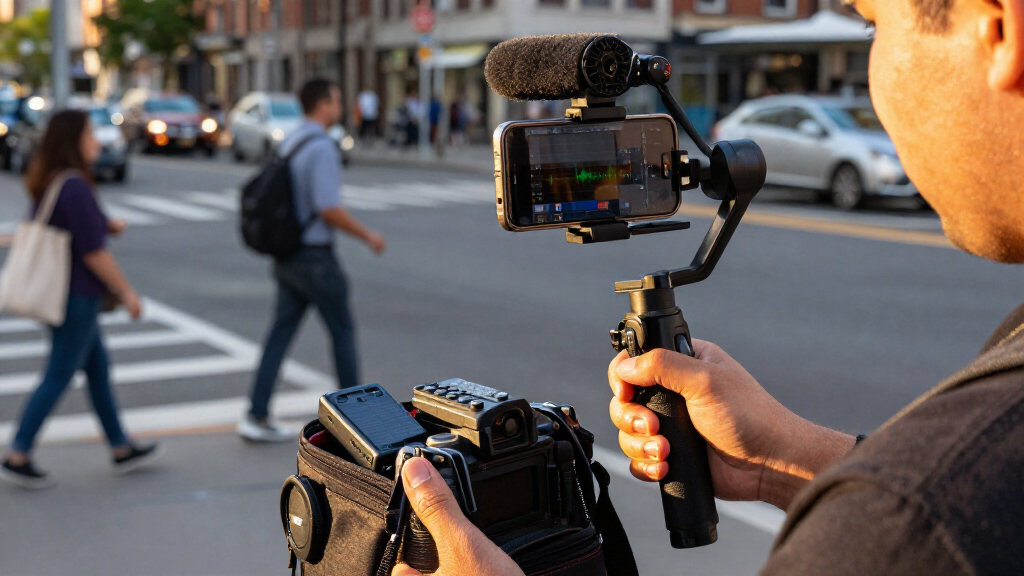

This checklist is for reporters who need to capture clear audio and video while moving between interviews, events, and locations. It covers portable recording, wireless microphone use, smartphone footage, lighting, backup power, and rain protection.

Get everyday essentials delivered free with Prime
- Fast, free delivery on millions of items
- Prime Video, Amazon Music and more included
- Member-only deals all year
The sections follow the main parts of a small reporting kit. Each product pick has a practical verdict, while the power bank slot offers selection advice because no specific model was provided.
Use the checklist to match each item to your reporting setup. Check device compatibility, how you will carry and operate the gear, and whether it fits the way you work before adding it to your kit.
Portable audio recorder
A portable recorder gives you a dedicated way to capture interview audio and ambient sound. It can be useful when a camera or phone is busy framing the shot, when you want a separate recording as backup, or when you need to place the recorder near a speaker. The Zoom H2 Handy Portable Stereo Recorder is the pick for this slot.
A common mistake is choosing a recorder without checking how you will monitor and manage recordings in the field. Consider whether its controls are easy to reach during an interview, whether you can keep it steady and close enough to the sound source, and whether its connectors fit any microphones or headphones you plan to use. Confirm how recordings transfer to the device you use for editing, and plan how you will label files so interviews do not get mixed up.
Think through the whole setup before reporting: where the recorder will sit, how you will avoid handling noise, and how you will check that recording has started. Keep backup capture and file transfer in your routine, especially when a missed recording would be difficult to repeat.
What to look for:
- Controls you can operate confidently during an interview
- A practical way to monitor or check recordings
- Connections that match your microphones and headphones
- A file-transfer path compatible with your editing device
- A carrying plan that keeps the recorder accessible and steady
Zoom H2 Handy Portable Stereo Recorder

The Zoom H2 is a portable digital recorder with four built-in microphones for stereo and 360-degree recording. It records WAV and MP3 audio, supports SD cards up to 32 GB, and includes USB connectivity for transferring files or using it as a USB microphone.
Pros:
- Four microphones provide flexible stereo and 360-degree recording
- Records in WAV and MP3 formats with multiple quality settings
- USB connectivity supports file transfer and USB microphone use
- Supports SD cards up to 32 GB
Cons:
- Requires two AA batteries
- The description has inconsistent storage capacity details
Best for: Reporters who want a separate device for recording interviews and ambient sound.
Not ideal for: People who need an all-in-one phone-based recording workflow.
Bottom line: Choose the Zoom H2 when a dedicated recorder fits your reporting workflow and your audio connections are compatible.
Wireless lavalier microphone
A wireless lavalier system can keep a speaker’s voice close to the microphone while the camera or phone stays farther away. That can help when a reporter needs to frame a moving interview or stand back during a conversation. The pick is the Shure BLX14/CVL Wireless Lavalier System, H9 Band (512–542 MHz).
Before buying, check that the system can connect to the exact recording device you plan to use. Camera, phone, and recorder inputs may differ, and adapters can affect the setup. Confirm the receiver’s output connection, the transmitter and receiver power requirements, and how you will attach the lavalier to clothing. For a phone workflow, verify the required adapter and whether it supports the phone’s input arrangement.
Wireless setups also need a simple pre-interview routine. Test the signal where you will record, listen for clothing rustle, and keep the microphone positioned consistently. The listed band is 512–542 MHz; check that it is suitable for your location and planned use. Keep a wired or built-in audio option available if the wireless link is not usable in a particular setting.
What to look for:
- Receiver output that matches your recorder or camera input
- Required adapters for the phone or device you plan to use
- A secure lavalier clip and practical cable routing
- Power arrangements for both transmitter and receiver
- Band suitability for your location and planned use
Shure BLX14/CVL Wireless Lavalier System, H9 Band (512–542 MHz)

This wireless lavalier system includes a BLX4 single-channel receiver, BLX1 bodypack transmitter, and CVL cardioid microphone with clip and windscreen. It offers up to 14 hours of operation on two AA batteries and a line-of-sight range of up to 300 ft (100 m).
Pros:
- Hands-free, discreet microphone for speech
- Up to 14 hours of battery operation
- Includes receiver, transmitter, microphone, and accessories
- Supports up to 12 compatible systems per band
Cons:
- H9 frequency band availability depends on local regulations
- Stated range is line-of-sight and may vary in typical use
Best for: Reporters who need a lavalier setup for interviews with some distance from the camera.
Not ideal for: People who cannot confirm input compatibility or band suitability for their location.
Bottom line: Choose this Shure system after confirming its connections, power needs, and band fit your reporting setup.
Smartphone camera stabilizer
A stabilizer can make handheld smartphone footage easier to manage when you are walking, panning, or filming a stand-up. The pick is a Smartphone Gimbal Stabilizer with Retractable Selfie Stick and Tripod. Its listed combination of a gimbal, retractable selfie stick, and tripod makes it a flexible slot for a phone-based video kit.
Check that the clamp can hold your phone with its case attached, if you plan to keep the case on. Also confirm that the phone’s dimensions and weight are within the stabilizer’s supported range. A frequent buying mistake is overlooking the balance and setup process: added accessories, such as a microphone or light, may change how the phone sits or may not fit alongside the gimbal. Review the mounting options and controls before relying on it for an assignment.
Consider how you will use the tripod and selfie stick in real locations. You may need a clear, stable surface and enough room to set up without blocking people or pathways. Check the controls and charging method, and practice switching between handheld movement and a stationary shot. Keep the phone’s framing and orientation in mind so the footage fits the intended publishing format.
What to look for:
- Phone size and weight compatibility, including the case
- Mounting space for any accessories you intend to use
- Controls that suit your filming style and phone
- A stable place to deploy the tripod
- Charging method and a workable setup routine
Smartphone Gimbal Stabilizer with Retractable Selfie Stick and Tripod

This 1-axis gimbal stabilizer helps reduce hand shake and supports horizontal or vertical phone positioning. It folds to 7.5 inches, extends to 31.5 inches, and converts into a tripod for hands-free use.
Pros:
- Helps reduce hand shake for smoother footage
- Folds compactly and extends for selfies or group shots
- Converts into a tripod for hands-free use
- Supports horizontal and vertical phone positioning
Cons:
- Uses 1-axis stabilization
- Not water resistant
Best for: Reporters who film smartphone stand-ups, walk-throughs, or interviews.
Not ideal for: People whose phone or accessories fall outside the stabilizer’s supported setup.
Bottom line: Choose this stabilizer when your phone fits securely and its tripod and stick suit your filming locations.
Portable LED video light
A portable light can help make a subject easier to see when available light is limited or uneven. The pick is the GVM 2-Pack LED Video Lighting Kit with App Control. Two lights can give you options for positioning light on a subject and adjusting the scene, provided the kit fits your space and power plan.
Check how the lights are powered and whether the required cables or accessories are included for your use. Confirm what stands, mounts, or other supports you need; a lighting kit is only practical if you can place it safely at the location. App control may be convenient, but verify that the app works with your phone and that you can still operate the lights when your phone is occupied or unavailable.
A common mistake is packing lights without accounting for setup time, room to position them, and the way they affect the scene. Think about whether you can carry both units, set them up without obstructing the interview, and manage cables or power sources. Practice with the actual camera or phone you plan to use, since light placement and framing need to work together. For quick street interviews, consider whether one light or available light is a more workable choice.
What to look for:
- Power requirements and included cables for your use
- Compatible stands, mounts, or supports
- App compatibility with your phone
- A way to operate the lights when the phone is occupied
- A carrying and setup plan for both lights
GVM 2-Pack LED Video Lighting Kit with App Control
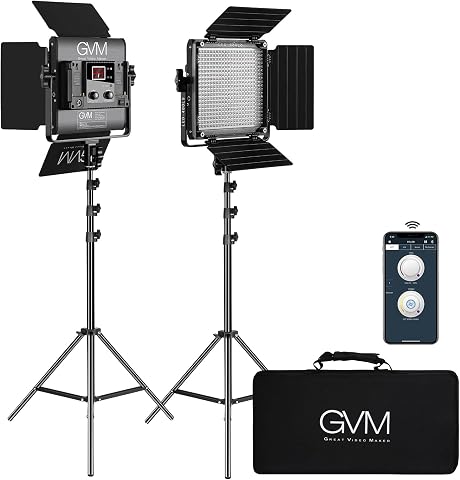
This two-panel LED lighting kit offers app and onboard control of brightness and color temperature, with a digital display and soft diffusers for portrait and video lighting. It includes light stands, power adapters, barn doors, and a carrying bag; panels can run on AC power or compatible Sony F-series batteries, which are not included.
Pros:
- App and onboard controls with a wide adjustable color temperature range
- High CRI and TLCI ratings for color rendering
- Includes stands, diffusers, barn doors, adapters, and a carrying bag
- Can run on AC power or compatible batteries
Cons:
- Compatible batteries are not included
- The raw listing gives conflicting warranty details: 180 days and one year
Best for: Reporters who can carry and position two lights for planned video interviews.
Not ideal for: People who need a minimal setup for fast-moving assignments.
Bottom line: Choose the GVM kit when its power, app, support, and setup needs fit your reporting locations.
Power bank charger
A power bank helps keep phones and other rechargeable devices available through a reporting day. Since no specific product is listed for this slot, choose one based on the devices you need to charge and the connections they use. Start with a device-by-device list so you know which ports, cables, and charging methods your kit requires.
Check the power bank’s capacity and output against the device makers’ requirements, and confirm that it can charge your phone while you are also using it to record or navigate. A common mistake is focusing on capacity alone while overlooking charging speed, port type, cable compatibility, or the bank’s own recharge time. If you want to charge more than one device at once, verify the number of usable outputs and how their power is shared.
Consider how the bank fits into your bag and whether you can reach it while working. Confirm any relevant airline or workplace rules before travel, and keep the cables organized so you can connect the right device quickly. A power bank should support your actual routine: estimate which devices need charging, when you can recharge the bank, and whether you need one or more charging ports available at the same time.
What to look for:
- Capacity suited to your devices and reporting day
- Output and port types compatible with your gear
- Enough simultaneous outputs for your charging routine
- A recharge method and time that work between assignments
- A size and cable setup you can carry conveniently
Camera rain cover
A rain cover can help shield a camera during wet-weather reporting while leaving you able to operate it. The pick is the Think Tank Photo Emergency Rain Cover for DSLR and Mirrorless Cameras. Confirm that the cover suits the size and shape of your specific camera setup before relying on it outdoors.
Check the camera body and lens combination you expect to use, including any hood, microphone, or other accessory that changes the setup’s shape. A frequent mistake is checking only the camera body and discovering that the assembled kit does not fit or that key controls are hard to reach. Look for access to the viewfinder or screen, buttons, lens controls, and cable connections you need while recording.
Practice putting the cover on and adjusting it before you are in the rain. Make sure you can keep a secure grip and operate the camera without exposing more of the kit than needed. Consider where the cover will be stored when dry and how you will pack it after use. A cover is one part of a wet-weather routine, so keep camera handling and storage in mind when moving between locations.
What to look for:
- Fit for your camera body and intended lens combination
- Room for accessories that will stay attached
- Access to the controls and screen you use
- A setup that allows a secure grip while operating the camera
- A practical way to store it between wet-weather assignments
Think Tank Photo Emergency Rain Cover for DSLR and Mirrorless Cameras, Medium (R

This rain cover provides extreme protection for DSLR and mirrorless cameras with 70-200mm lenses in heavy rain or dusty conditions. It features a seam-sealed design, a large viewing window, and compresses into a compact pouch for easy transport.
Pros:
- Provides excellent protection in harsh weather conditions
- Compact and portable design
- Large window for easy LCD viewing and controls
Cons:
- May be bulky for small cameras
- Limited to medium-sized lenses
- Requires careful fitting to ensure waterproof seal
Best for: Reporters carrying a compatible DSLR or mirrorless camera in wet conditions.
Not ideal for: People whose camera and lens combination has not been checked for fit.
Bottom line: Choose this cover after confirming it fits your assembled camera and leaves essential controls accessible.
Build the kit in a budget-first order: cover the job’s essential audio and power needs, then add the camera support, lighting, and weather protection your assignments call for. Prioritize compatibility and the gear you will use regularly before filling gaps that come up only occasionally.
Use this checklist as a starting point, then test your complete setup before an assignment. A little practice with connections, placement, charging, and packing can make field reporting feel more predictable and manageable.
Black Friday Picks

KitchenAid Classic Series 4.5-Quart Tilt-Head Stand Mixer, Onyx Black
As an affiliate, we earn on qualifying purchases.